FREE TEMPLATE

A free story bible template for your novel

One place for what your novel has to keep straight, from the cast and how they change to the threads you still have to close. Six printable pages: five to fill in, and a worked example from A Christmas Carol. Print it, or fill it in with a PDF annotation app.

Download the PDFStart it in Loomworld instead

Printable PDF · A4 · 6 pages, including a worked example · free to use and adapt

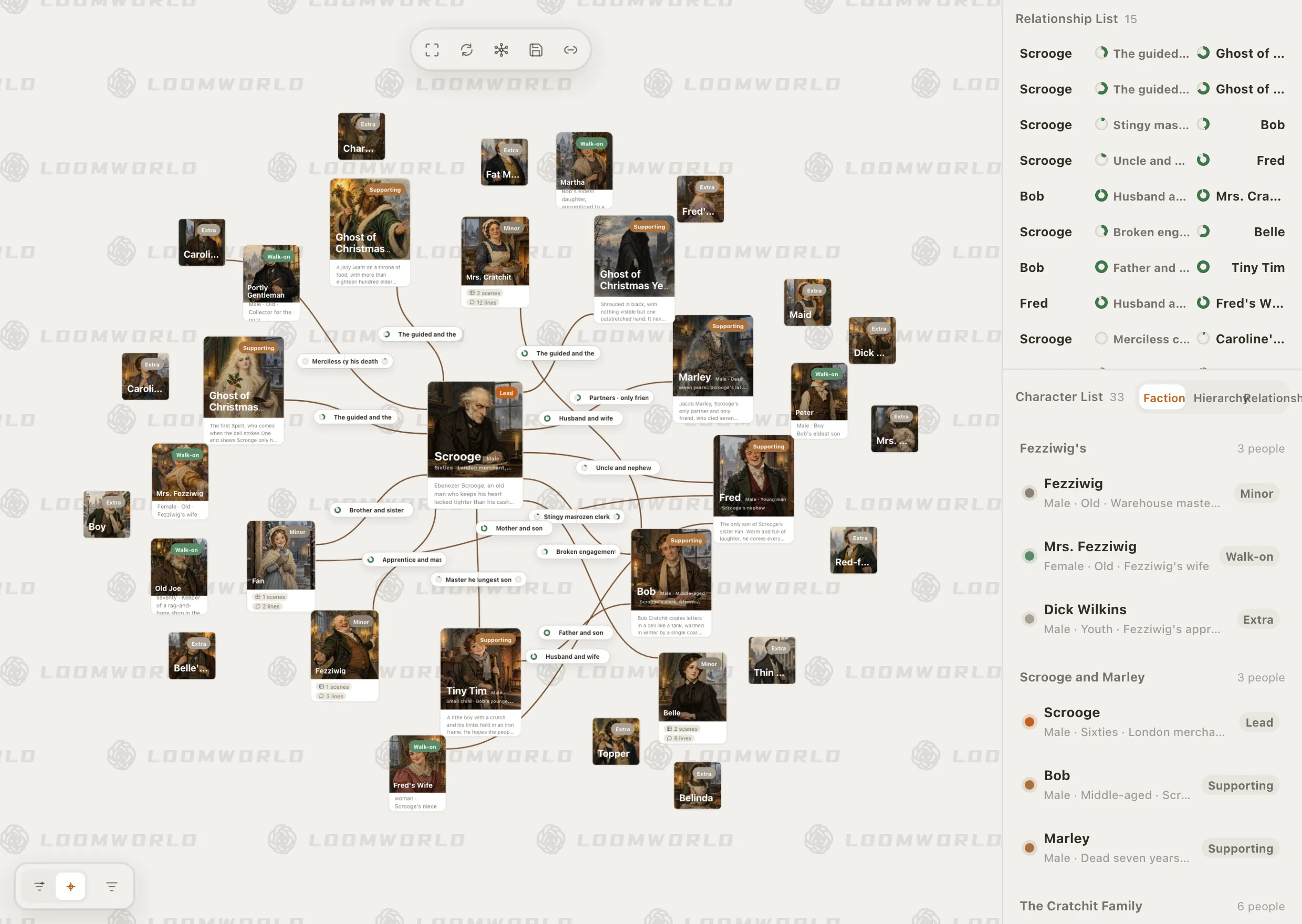
Loomworld character module: the relationship canvas for A Christmas Carol, with Scrooge at the centre, and the character list grouped by faction

What a story bible saves you from

01

Facts scattered across notes

A name in a notebook, a birthday in a margin, a rule in a chat with a friend. When you need it in chapter 20, you cannot find it.

02

Facts that change mid-book

A character switches sides, a ring changes hands, a city falls. A bible that records only how things started is wrong about the second half of the book.

03

Rereading to check one detail

Without a record, checking what colour her eyes were means skimming eight chapters. With one, it takes a minute.

What is in the template

Ten sections, built around what changes

Characters, relationships and objects have columns for the chapter where something changes, because old facts that were never updated cause many continuity slips. Places, rules and threads record the chapter where they first appear or are paid off.

  • The book at a glance: pitch, point of view, story time covered
  • Characters, with a log of changes by chapter
  • Relationships, written from each side
  • Places, with what is inside what and travel times
  • Objects, and who holds them chapter by chapter
  • World rules, each with its cost or limit
  • Timeline: story date, event and the chapter where readers meet it
  • Open threads, a style sheet and a continuity log
A worked example to copy from

The last page fills in examples from five of the sections, from A Christmas Carol: Scrooge's change in the fifth stave, Marley's chain, the rule that what the Spirits show can be altered, and Tiny Tim's fate as an open thread set up in stave three and closed in stave five.

Story time and chapter order, kept apart

The timeline page gives every event two positions: when it happens in the world, and the chapter where the reader meets it. Flashbacks, prologues and letters are where those two orders split, and where dates tend to go wrong.

Novel continuity checker

Keep the bible next to the draft

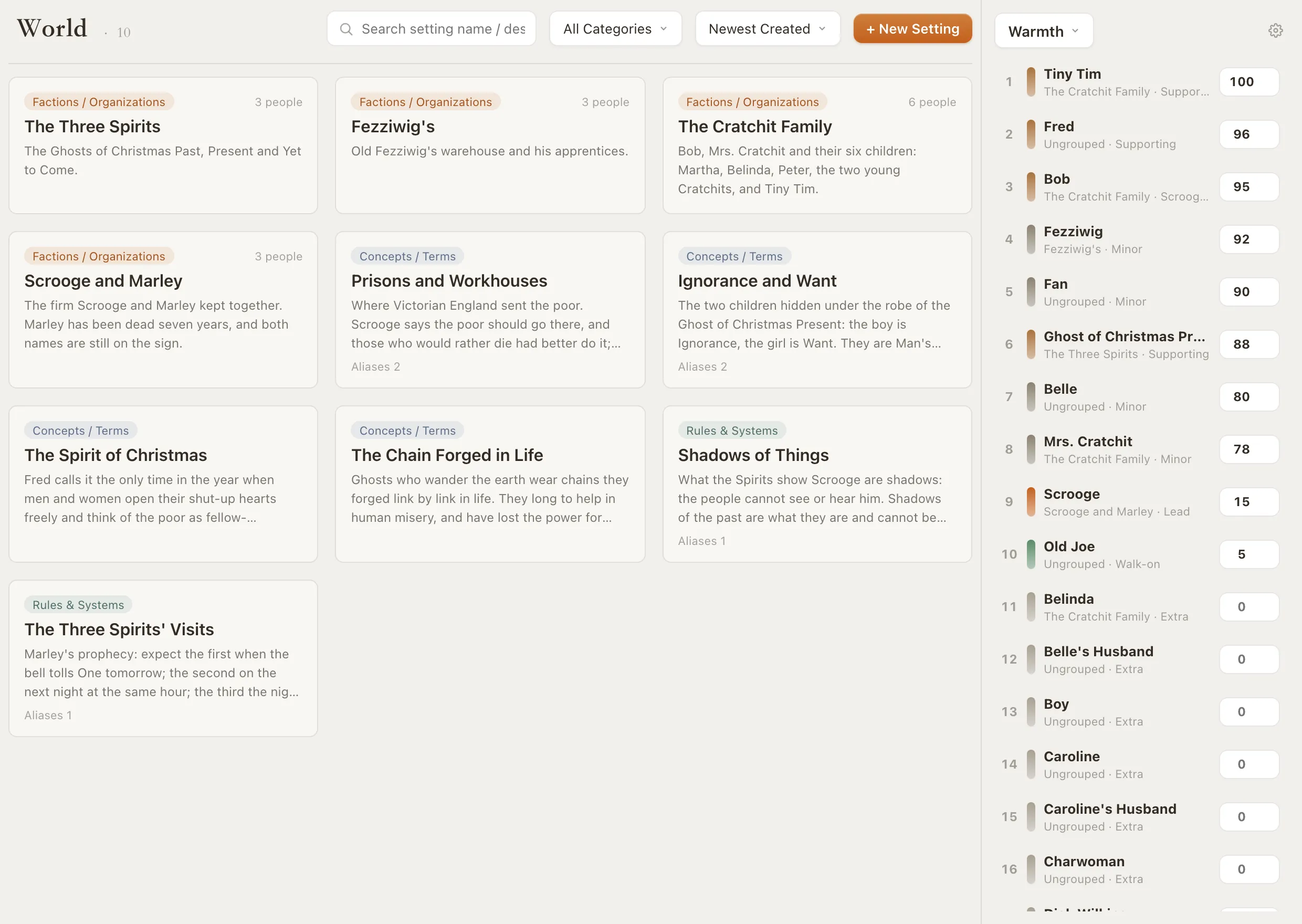
In Loomworld most of these sections are modules in the same project as your manuscript: characters and relationships, places, props, world entries, the timeline and the Foreshadowing Manager. A style sheet or continuity log you keep as notes of your own. Character cards are created when you write dialogue as speaker lines, and you can link names in the text to their cards with right-click → Connect to….

Changes by chapter are yours to record: turn on the Activity toggle beside a character's age, occupation, faction or phase status (their state at that point in the story) and add a change point at the chapter where it happens. Props have the same kind of track for their owner, and timeline events link to the scene where they happen. Loomworld will not fill in the whole bible from your prose, and the Foreshadowing Manager only tracks threads you mark yourself.

Story bible software

Loomworld world module: entries for the Three Spirits, the Spirit of Christmas and other world notes from A Christmas Carol

Writing a series?

This template is for one book. For a series, the series bible template adds a table of books, each character's status at the end of every book, and threads that run across books.

Series bible template

How to use it

  1. 1

    Start with the next chapter

    Fill in what the chapter you are about to write depends on first. However you build it, the bible is only useful if you update it when facts change.

  2. 2

    Write the chapter of every change

    When a fact changes, add a row with the chapter number instead of crossing out the old value. You will need both when you revise.

  3. 3

    Check it before you revise

    Read the rows for a chapter before you rework it, and log any slip you find with the chapter where the fact was first set.

Paper, a document or Loomworld

The same sections work on paper, in a document you build yourself, or as a guide to organising your notes in Loomworld. What changes is how much of the upkeep you do by hand.

CapabilityLoomworldThis PDFA plain document
CostFree plan; AI from $4.99 per 30 daysFreeDepends on your editor
A printable worksheet—If you build one
Characters added as you write dialogue——
Facts recorded by chapterActivity toggle and prop owner tracksFrom-chapter columnsTables you build
Linked to the manuscript—Links you add by hand
Checks the draft against your recordsContinuity check (subscription, cloud sync)——

“A plain document” means a document you maintain by hand, without plug-ins or AI. The PDF is free to use and adapt for your own books.

Frequently asked questions

What is a story bible?

A reference document for one story: who the characters are and how they change, where things happen, what objects matter, the rules of the world, when events happen and which threads are still open. Writers use it to keep the book consistent and to avoid rereading chapters to check a detail.

What should a story bible include?

At least characters, places, important objects, world rules and a timeline. Add relationships, open threads, a style sheet for spellings and a continuity log as the book grows. The most useful habit is noting the chapter where each fact changes.

What is the difference between a story bible and a series bible?

This template is designed for one book. For a series, a bible usually also needs what carries across books: which book covers which stretch of story time, where each character stands at the end of every book, and threads that stay open from one book to the next.

Can I use this template in Google Docs or Word?

The template is a PDF made for printing or for filling in with a PDF annotation app; there is no Word or Google Docs version. To use it in a document, recreate the tables there using the same section headings and columns.

Is the story bible template free?

Yes. Download the PDF, print it and adapt it for your own books.

Fill in one chapter's worth

Download the template and fill in what your next chapter depends on. Or start a free project and keep the same sections next to your draft.