STORY BIBLE SOFTWARE

Story bible software that lives next to your draft

Most story bibles are a second document that slowly drifts out of date. In Loomworld the bible and the manuscript are one project. Characters, places, props, world notes, the timeline and your foreshadowing link to the scenes they appear in, and Quill, the built-in AI, reads all of it before it suggests a word.

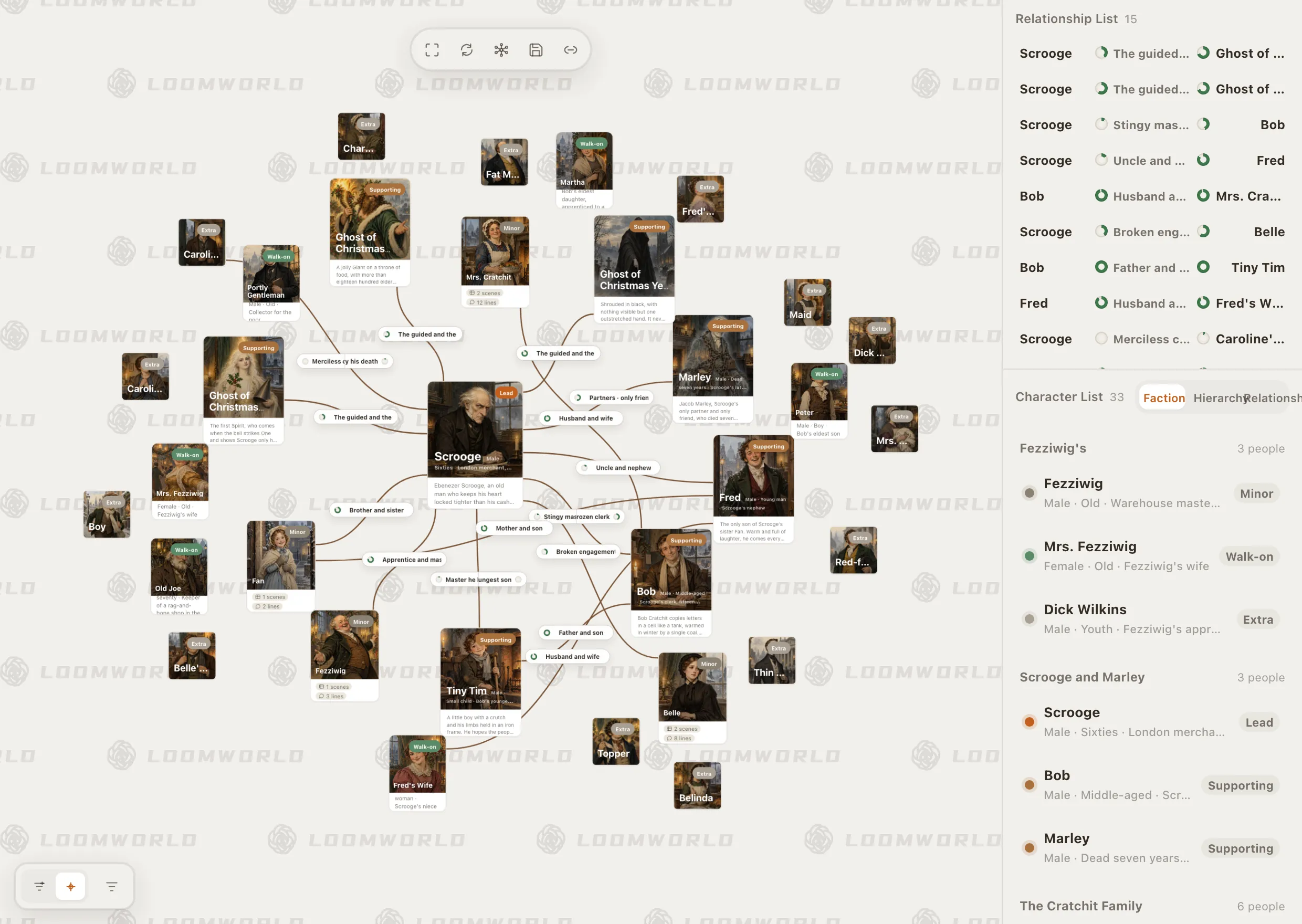
Loomworld character module: the relationship canvas for A Christmas Carol, with Scrooge at the centre, and the character list grouped by faction

Why story bibles fall apart around chapter twenty

01

It is a separate file

The bible sits in Notion, a spreadsheet or a binder folder. Every change to the draft needs a matching change there, and by the middle of the book nobody is making it.

02

Nothing is linked

A character sheet does not know which scenes the character is in. To answer “when did she last have the letter?” you search the manuscript by hand.

03

The AI has not read your book

Paste a chapter into a chatbot and it forgets eye colours, family trees and the rule you set for magic in chapter two. Its suggestions contradict the canon you already wrote.

What a Loomworld story bible holds

Characters, and the web between them

Every character gets a card: role, age, description, aliases, and the scenes and lines they appear in. Relationships are drawn on a canvas, so a family, a faction or a love triangle reads as a picture instead of a paragraph.

Aliases resolve to one person. A hero who travels under three names is still counted as one character in every scene.

  • Relationship canvas and list
  • Faction and hierarchy views
  • Aliases that resolve to one character
  • Scene and line counts per character
How characters work

Loomworld character module: the relationship canvas for A Christmas Carol, with Scrooge at the centre, and the character list grouped by faction

Places, props and the rules of the world

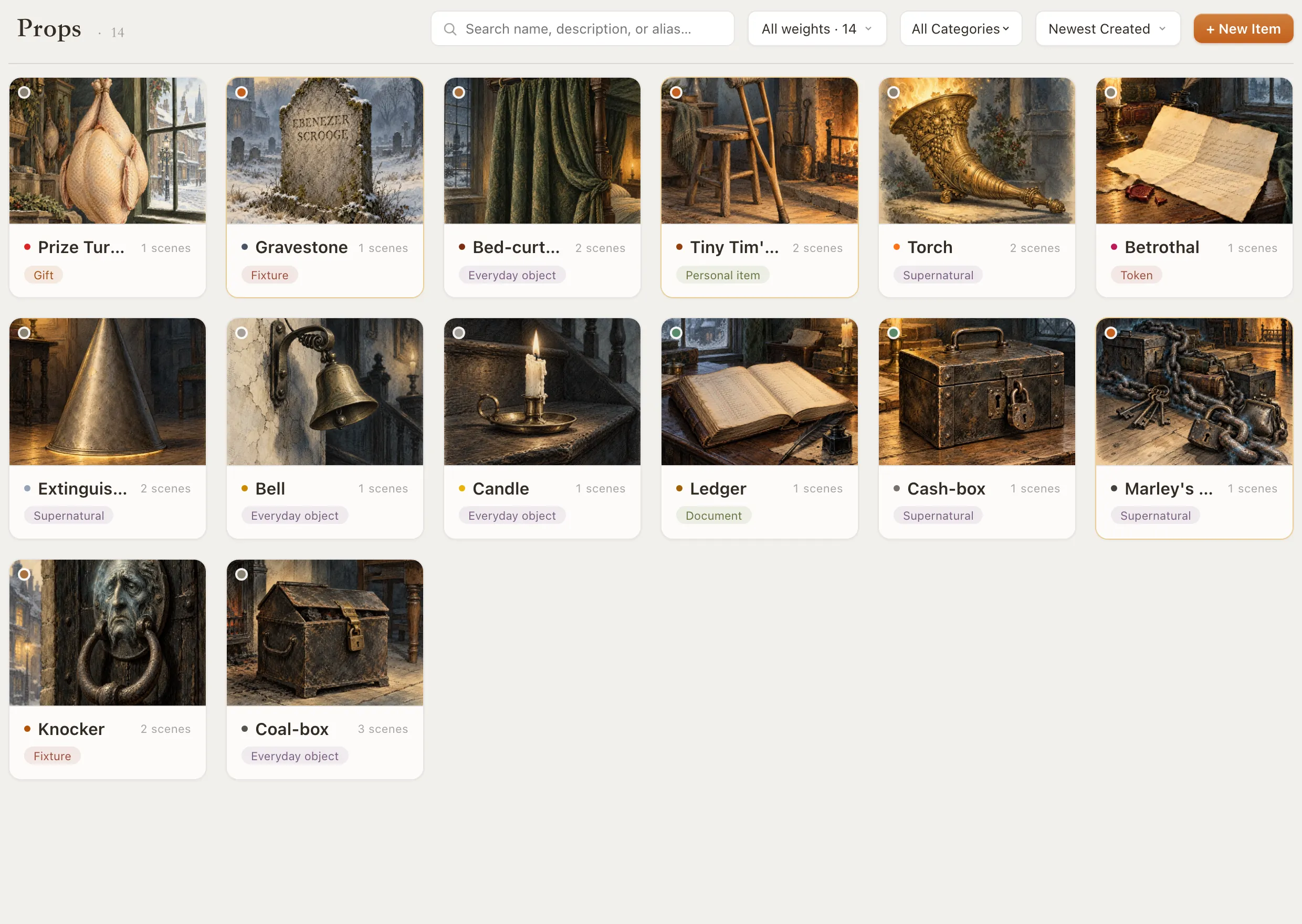
Locations nest, from country to city to the room where the argument happens, and can sit on a map. Props are cards you bind straight from the draft, so you can see every scene where the knocker, the chain or the unsent letter turns up.

World notes hold the things that are true everywhere: magic systems, institutions, history, the law of the land.

  • Nested locations on a map
  • Prop cards bound from the draft
  • World notes for rules, factions and history

All reference modules

Loomworld props module: cards for the knocker, the coal-box, Marley's chain and other objects from A Christmas Carol

A timeline with two clocks

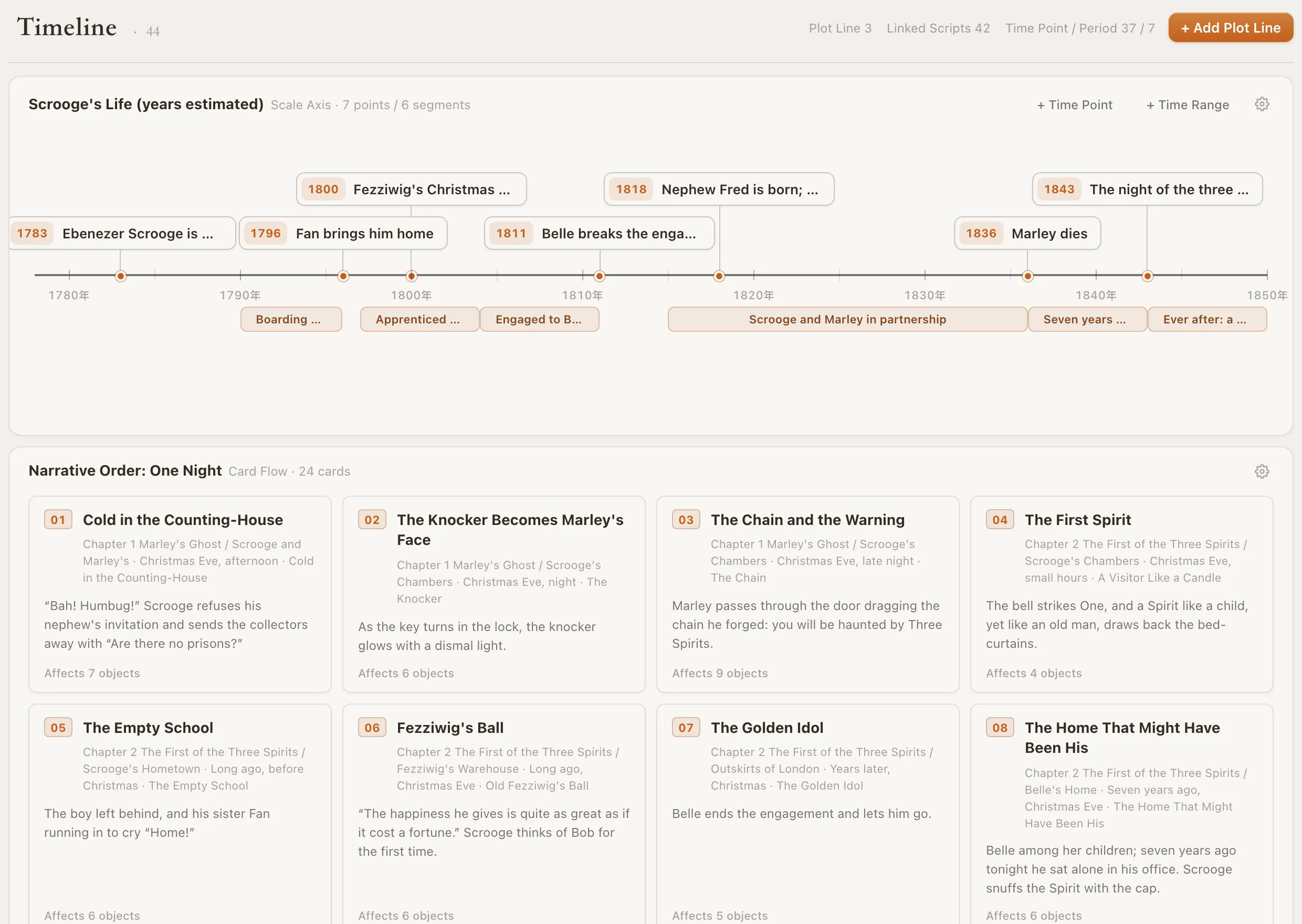
Story time and reading order are different things. The timeline keeps both: a scale axis for when events happened, and a card flow for the order the reader meets them. Each event links back to its chapter and scene, so flashbacks never scramble the chronology.

  • Scale axis with time points and ranges
  • Narrative-order card flow
  • Several plot lines side by side

How the timeline works

Loomworld timeline: Scrooge's life on a scale axis from 1783 to 1843, above the one-night narrative order as numbered scene cards

Foreshadowing with a due date

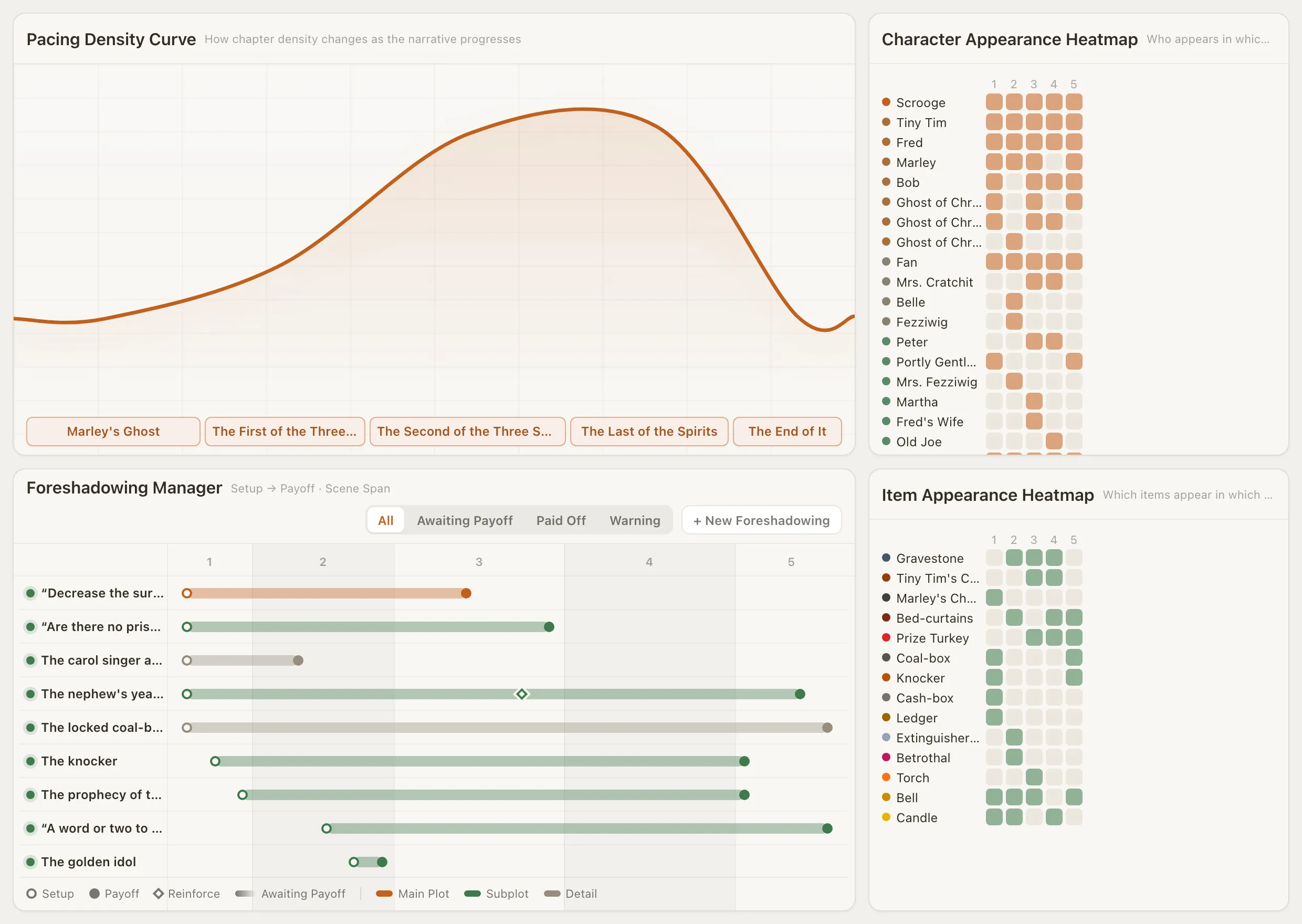
Every setup is a promise. The Foreshadowing Manager records where you planted it, where you reminded the reader, and where you pay it off, draws the span across your chapters, and warns you when a thread has waited too long.

See the foreshadowing tracker

Loomworld Beats page: pacing density curve, character and item appearance heatmaps, and the Foreshadowing Manager showing setup-to-payoff spans across five chapters

An AI that reads the bible first

Quill reads the manuscript and the whole bible before it answers. Ask it in the chat to continue a scene, to check chapter twelve against everything you have established and list the contradictions, or to record a new character, and it comes back with a proposal.

Nothing in your draft or your bible changes until you approve that proposal. Your words stay yours.

How AI collaboration works

  • Continuity checks on request
  • Proposals you confirm or discard
  • One undo after you confirm

Start a story bible in three steps

  1. 1

    Start from a sentence or a draft

    Create a project from a one-line premise, or attach a TXT or DOCX draft and use it as the manuscript. Your text goes in exactly as written.

  2. 2

    Bind names as you write

    Type @ to mention a character, place or prop, or put a prop in brackets. Mentions link the draft to the bible, and an alias still points at the same card.

  3. 3

    Let the bible count for you

    Appearances, heatmaps, timeline links and foreshadowing spans are computed from the draft. When something drifts, ask Quill to check it against the bible.

Loomworld compared with the usual story bible tools

Notion templates, Scrivener and spreadsheets are all good at holding notes. The difference is whether the bible knows about your manuscript.

CapabilityLoomworldNotion templateScrivenerSpreadsheet
Bible and manuscript in one project——
Characters linked to the scenes they appear inManual relationsManual links—
Relationship map———
Timeline of story eventsDate-based viewVia Aeon TimelineManual
Setup-to-payoff foreshadowing trackingManualManualManual
AI that reads the whole book and bibleGeneral-purpose AI——
Free to startOne-time licence

Compared October 2026 from each product's public documentation. Tell us at [email protected] if something has changed.

Frequently asked questions

What is a story bible?

A story bible, also called a book bible or series bible, is the reference for a work of fiction: who the characters are, where things happen, the rules of the world, the order of events and the threads you have planted. Screenwriters keep show bibles for the same reason novelists keep story bibles: to stay consistent across a long book or a series.

What should a story bible include?

At minimum: characters (appearance, voice, relationships, arc), places, important objects, world rules, a timeline of events, and open plot threads with where they pay off. Loomworld has a module for each of these, and they all link to the scenes in your draft.

How do I create a story bible for my novel?

Start with the characters and places that already exist in your draft, then add the timeline and open threads. In Loomworld you create a project, write or import your manuscript, and mention characters, places and props with @ as you go. Cards collect their appearances automatically from those mentions.

Can I import a manuscript I have already written?

Yes. Attach a TXT or DOCX file when you create a project and choose “Use as the manuscript”. The text goes in as written, with no rewriting. Import does not invent bible cards for you: cards come from the character lines and references in your text, or from proposals you approve in the chat.

Is a story bible the same as a series bible?

Mostly. A series bible is a story bible that spans several books or seasons, so it puts more weight on continuity between volumes: ages, deaths, who knows what by the end of book two.

Does the AI write my book for me?

No. Quill proposes, you decide. Every change it suggests to the draft or the bible arrives as a proposal card, and nothing is written until you confirm it.

Is Loomworld free?

There is a free plan that stays free, and paid plans are listed on the pricing page. Loomworld runs in the browser, with no install needed.

Keep the bible where the book is

Start a project for free and bring your first chapter. The bible fills in as you write.