CONTINUITY CHECKER

A novel continuity checker that has read your whole book

Ask Quill, Loomworld's AI, to check a chapter, a scene or the whole manuscript. It reads the draft together with your story bible (characters, aliases, relationships, places, the timeline and world rules) and tells you what contradicts what. Any fix comes back as a proposal, and nothing changes until you approve it.

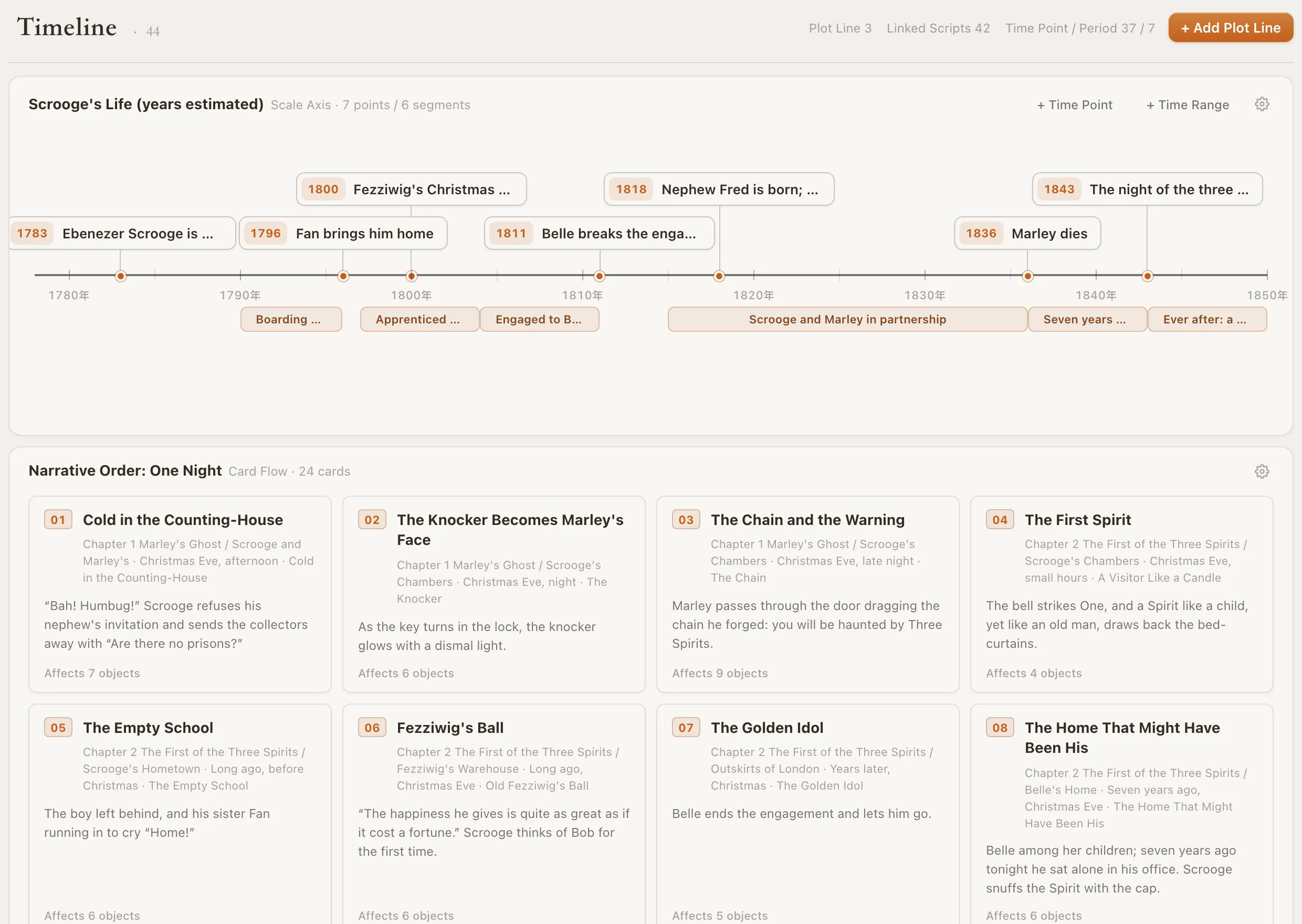
Loomworld timeline: Scrooge's life on a scale axis from 1783 to 1843, above the one-night narrative order as numbered scene cards

The continuity errors readers actually catch

01

Details that drift

Grey eyes in chapter two, brown in chapter nineteen. A limp that disappears. A name spelled two ways. Each one is easy to fix and hard to find.

02

Time that does not add up

She is thirty when the war ends and twenty-eight ten years later. The journey took three days out and one day back. Flashbacks make it worse.

03

Characters who know too much

Someone reacts to a secret they were never told, or a death they could not have heard about yet. These are the hardest to spot on a reread.

How continuity checking works in Loomworld

Ask in one sentence

Open the chat and pick the consistency check or plot-hole check from the Special menu, then name the range: one chapter, one scene, or the full script. Type @ to point at a specific character or place you are worried about.

It is one request, not a setup project. The check reads what it needs on its own; you do not paste anything in.

How the chat works

  • Consistency check and plot-hole check
  • A chapter, a scene or the whole manuscript
  • @ to focus on one character or place

Checked against the bible, not just the text

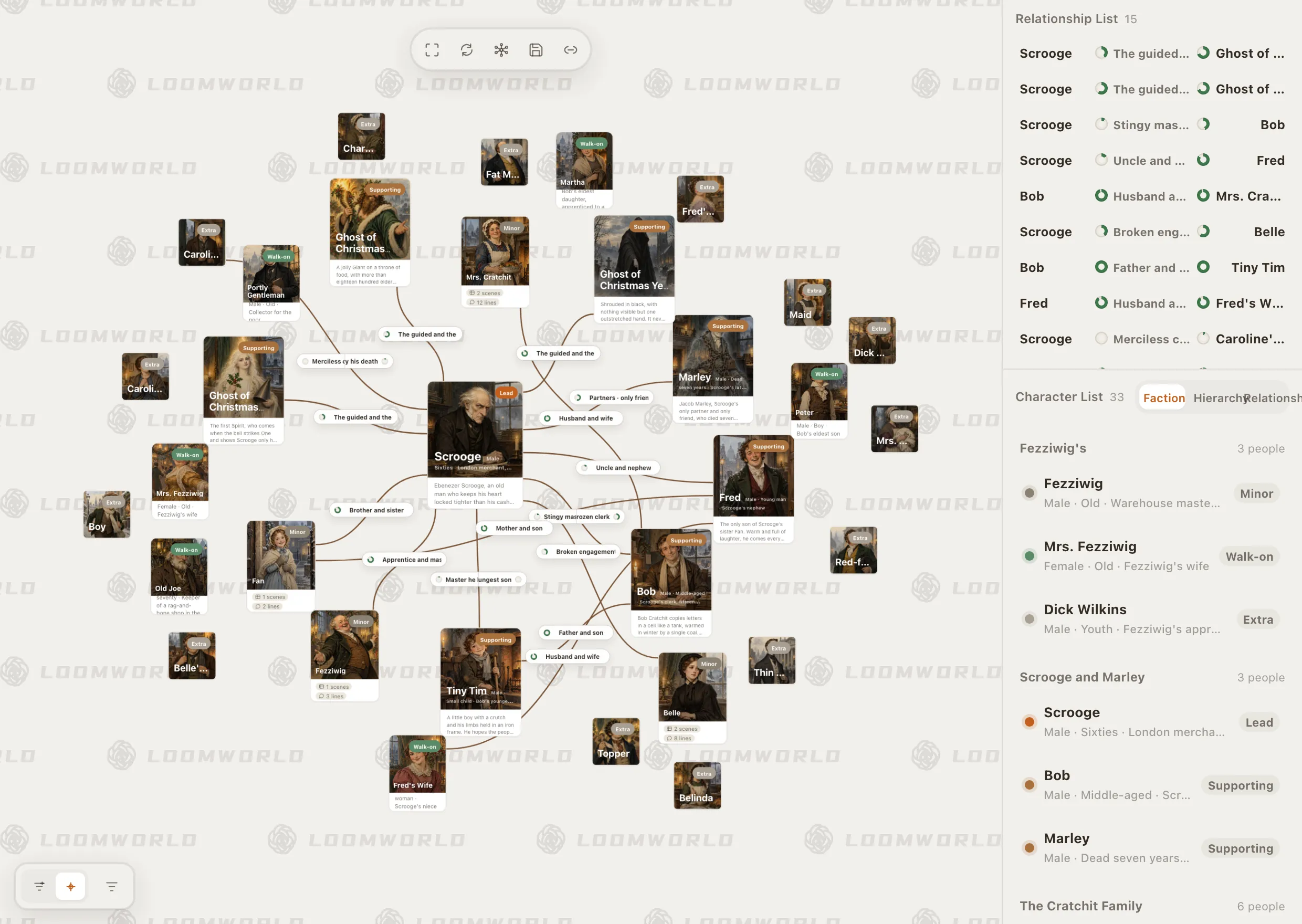
Quill reads the project graph: characters with their aliases and relationships, locations and their hierarchy, the timeline, world entries and the draft itself. Long manuscripts are read in pieces, so a growing book is not cut down to its first pages.

That is the difference from pasting chapters into a chatbot, which only knows what fits in the box.

Loomworld character module: the relationship canvas for A Christmas Carol, with Scrooge at the centre, and the character list grouped by faction

Fixes arrive as proposals

When you want something fixed, ask for a change. You get one confirmation card with the before and after for each edit, up to eight edits at a time. Apply it, adjust it or drop it; one undo reverses the whole card.

If the passage changed after the card was made, the card is refused rather than written over your newer text.

  • Before and after for every edit
  • Up to eight edits per card
  • One undo reverses the card

Continuity reports in the background

Stop writing for a while and Loomworld refreshes chapter summaries, character dossiers and continuity reports on its own. In the project's AI settings you can also run “check this chapter” or “check every chapter” whenever you like.

AI collaboration overview

Loomworld timeline: Scrooge's life on a scale axis from 1783 to 1843, above the one-night narrative order as numbered scene cards

Check your novel in three steps

  1. 1

    Bring the manuscript in

    Create a project and attach your TXT or DOCX draft as the manuscript. It goes in exactly as written.

  2. 2

    Ask for the check

    In the chat, choose the consistency check and name the chapters. Quill lists the contradictions it finds and where they are.

  3. 3

    Fix what you agree with

    Ask for the fixes you want as a proposal, review the before and after, and apply. The rest stays exactly as you wrote it.

Loomworld compared with other ways to check continuity

A good human editor is still the gold standard for judgement. The question is how much checking you can do yourself, as often as you like, before it reaches them.

CapabilityLoomworldChatbotHuman editorSpreadsheet
Reads the whole manuscriptWhat you paste—
Knows your story bibleWhat you pasteNotes you sendManual lookups
Fixes applied with your approvalCopy and pasteBy handBy hand
Run it again after every revisionCostlyBy hand
Human judgement about intent and taste———

Compared October 2026.

Frequently asked questions

What is a continuity checker?

A tool that compares what a manuscript says in one place with what it says elsewhere: names, appearances, ages, dates, distances, who knows what and when. It flags contradictions so you can decide which version is right.

How does Loomworld find contradictions?

Quill reads the draft together with your story bible (characters and aliases, relationships, places, timeline and world entries) and compares them. You run it from the chat with the consistency check or plot-hole check, on a chapter, a scene or the full script.

Will it rewrite my book?

No. Checking writes nothing. If you want a fix, ask for one and it comes back as a proposal with a before and after. Nothing changes until you apply it, and one undo reverses it.

Is it always right?

No. AI can miss a contradiction or flag something that is intentional, like an unreliable narrator. Treat its findings as a list to review; the final judgement is yours.

Does it work on long novels and series?

Yes. Long manuscripts are read in pieces rather than truncated, and the story bible carries facts across chapters so the check is not limited to one passage.

Is my manuscript used to train AI?

No. Loomworld does not use your script text to train or improve any model. It is sent only to complete the tasks you start.

What does it cost?

Quill, the AI, comes with a paid plan, from US$4.99 for 30 days. The editor and story bible stay free.

Find the slips before your readers do

Start a project, bring your manuscript, and ask Quill to check the first chapter.