How to keep track of a timeline in a novel
Timelines go wrong in two ways: the dates don't add up (ages, journeys, seasons), or the story time gets tangled with the order the reader learns things in. This guide keeps those apart and follows one example through four steps. The method works on paper or in a spreadsheet; where Loomworld helps, we say how.
Write down when each event really happens
List the events of the story in the order they happen in the world, not the order you wrote them. Give each one a date, or at least a marker you can count from: day 1, the third winter, year 312. If your world has its own calendar, use it, but decide how many months a year has before you start, because every age and journey depends on it.
Keep each entry short: what happened, who was there, where. You are building a reference you can scan in a minute, not a second draft.
Mark where the reader meets each event
Next to every entry, note the chapter and scene where it appears on the page. Flashbacks, prologues and letters are where the two orders split, so they deserve the most care. An event the reader only hears about second-hand still gets a chapter number: the one where they hear it.
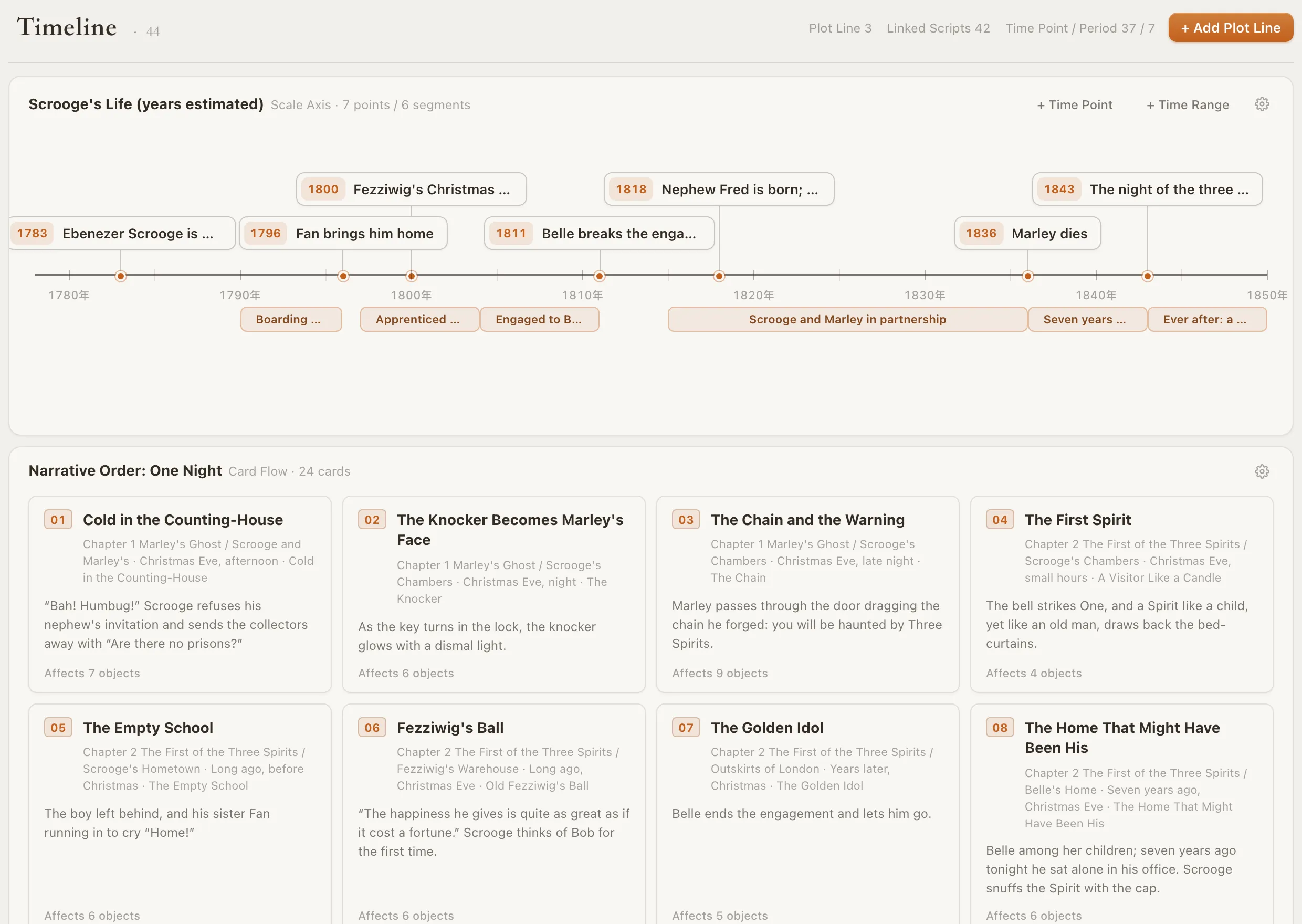
In Loomworld, a timeline can be shown as a scale axis, a dated line that shows years and durations, or as card flow, a row of event cards that only keeps order. Every event can carry a location in the draft, down to the chapter or scene, and Jump to Script takes you back to that spot. You add the events yourself; the timeline does not generate them from your text.
Two orders on one page in the A Christmas Carol demo project: Scrooge's life on a scale axis above, the one-night story as scene cards below.
Pin ages and gaps to fixed dates
Record birth dates, or at least birth years, rather than ages, and work the age out when you need it. Do the same for anything that takes time: travel, pregnancies, sentences served, the seasons. Many of the continuity errors readers spot are arithmetic: someone is thirty when the war ends and twenty-eight ten years later.
Loomworld does not calculate ages from dates. If you want a character's age on the card, turn on the Activity toggle beside Age and type the new value at the chapter where it changes; it holds until the next change. Work the number out from your dates first.
Check the timeline before you revise
Before you rework a chapter, decide which kind of change it is. Moving a scene to another chapter changes when the reader learns something: check what each character, and the reader, already knows at the new spot. Changing when something happens in the story changes the arithmetic: check ages, travel times and anything caused by it.
For a series, keep one running timeline for all the books and add to it, rather than starting fresh each book. If each book is its own Loomworld project, that series record is yours to maintain; timelines are not shared between projects. If you use Loomworld's AI, Quill, you can also ask it to check a chapter or the whole manuscript for contradictions, timing included. The check reports what conflicts and where without editing your manuscript; a fix is applied only if you approve it. Quill needs a sign-in, an active subscription and cloud sync turned on for the project.
Three ways to keep a timeline
Any of these works if you keep it up to date. The difference is how much of the upkeep you do by hand and whether the timeline knows where the draft is.
| Capability | Loomworld | Spreadsheet | Aeon Timeline |
|---|---|---|---|
| Story time and reading order together | Two columns you keep in step | Chronological and narrative views | |
| Events linked to the scene in the draft | Jump to Script from each event | — | Syncs with Scrivener or Ulysses |
| Write the manuscript in the same app | — | — | |
| Character ages worked out from dates | You enter ages by chapter | With your own formulas | |
| Price | Free plan; AI from $4.99 per 30 days | Depends on the app | 14-day trial, then $65 licence |
Checked 3 November 2026 against aeontimeline.com and its pricing page. Aeon Timeline is a dedicated, mature timeline tool and does more with dates than we do. Tell us at [email protected] if something has changed.
Frequently asked questions
What is the easiest way to keep track of a novel's timeline?
Keep one list in story order with a date or marker for every event, and note beside each one the chapter where the reader meets it. Record birth dates instead of ages. That covers most mistakes, whatever tool you use.
How do I keep track of flashbacks?
A flashback is an event dated earlier than the main story but placed later in the book. Record three things: when the event happened, when each character learned about it, and where the main story stands when the flashback appears. Check ages and who knew what against those dates.
How do I keep track of character ages?
Write down birth dates and work ages out from the timeline when you need them. In Loomworld you can record a character's age by chapter with the Activity toggle, but you type the value yourself; it is not calculated from the dates.
Does Loomworld build the timeline from my draft?
No. You add the events and link them to chapters and scenes yourself. If you ask Quill to arrange part of the timeline, it answers with a proposal you confirm or refuse, and one undo reverses it.
Can I use my own calendar for a fantasy world?
Partly. A scale axis can count in plain numbers or in years, and a plotline can use your own era name, number of months and month names. Day-level dates still follow the ordinary Gregorian calendar, so month lengths and leap years cannot be customised.
What does it cost?
Quill, the AI, needs a subscription, from US$4.99 for 30 days, and cloud sync turned on for the project. The editor and story bible stay free.
KEEP READING
Lay out one flashback
Start a free project, add the flashback's real date and the chapter where it appears, and see the two orders side by side.