FOR FANFIC WRITERS

Fanfiction writing software for long fics, AUs and the canon you need to keep straight

A multi-chapter fic has two sets of facts to juggle: what canon says, and what you changed. Loomworld keeps both in the same project as your draft. You write in chapters and scenes, and beside the text sit character cards with aliases and relationships, notes on the world's rules, and the chapter where your AU breaks from canon. You can do all of it without using the AI. When a chapter is ready, export it and post it wherever you publish.

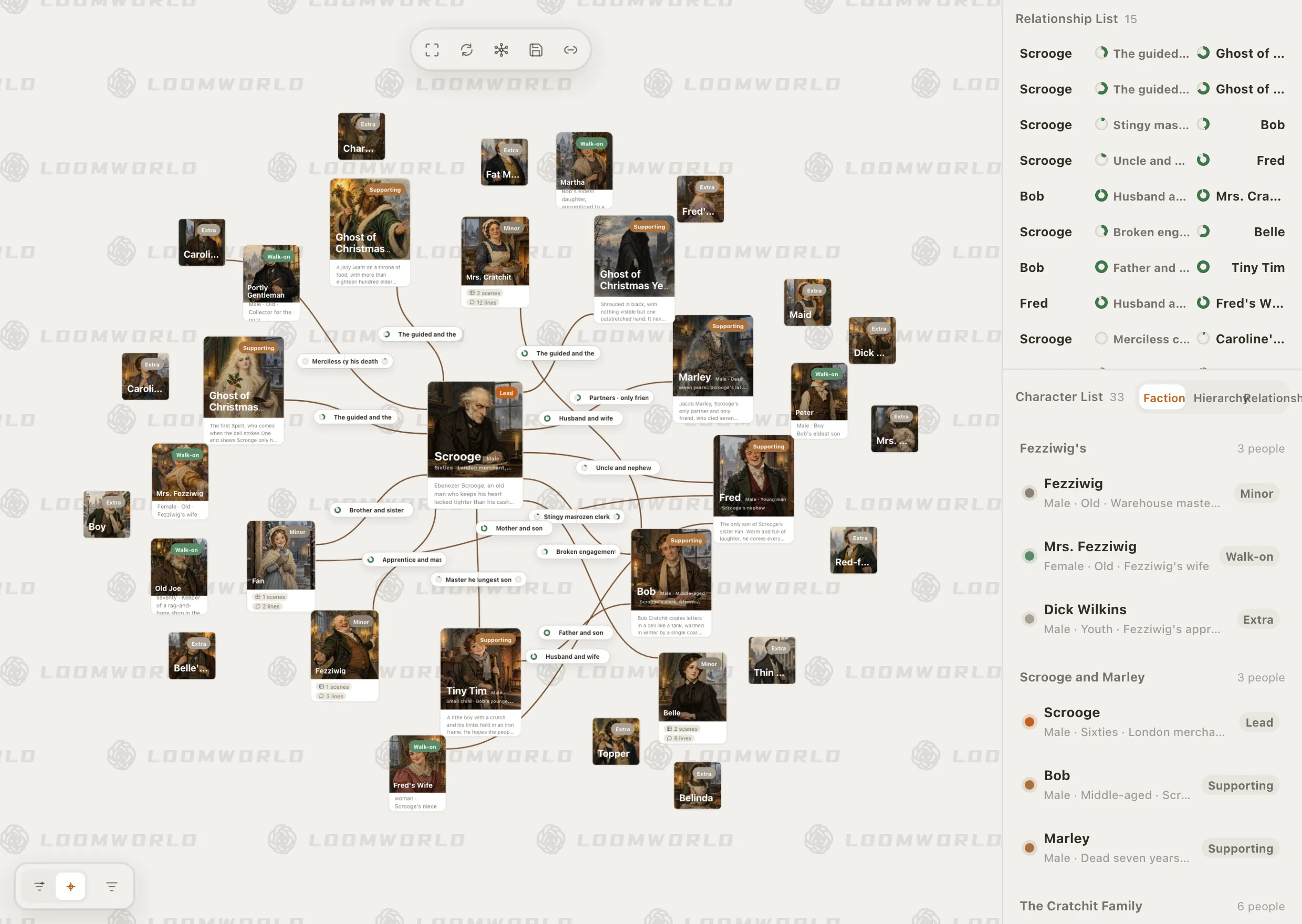
Loomworld character module: the relationship canvas for A Christmas Carol, with Scrooge at the centre, and the character list grouped by faction

What makes long fic hard to keep straight

01

Canon in one tab, the draft in another

The wiki, your notes and the draft live in different places. Checking a name, a rank or who knows what means leaving the scene you are writing.

02

Your AU changes things

In your version he never left, or she switched sides in chapter 12. Canon wikis cannot tell you what is true in your fic, and by chapter 30 you have to remember it all.

03

Drafts with an expiry date

AO3 deletes an unposted work's draft about a month after you create it. Long fics need somewhere to live between updates.

How Loomworld helps with long fic

Keep the canon you need beside the draft

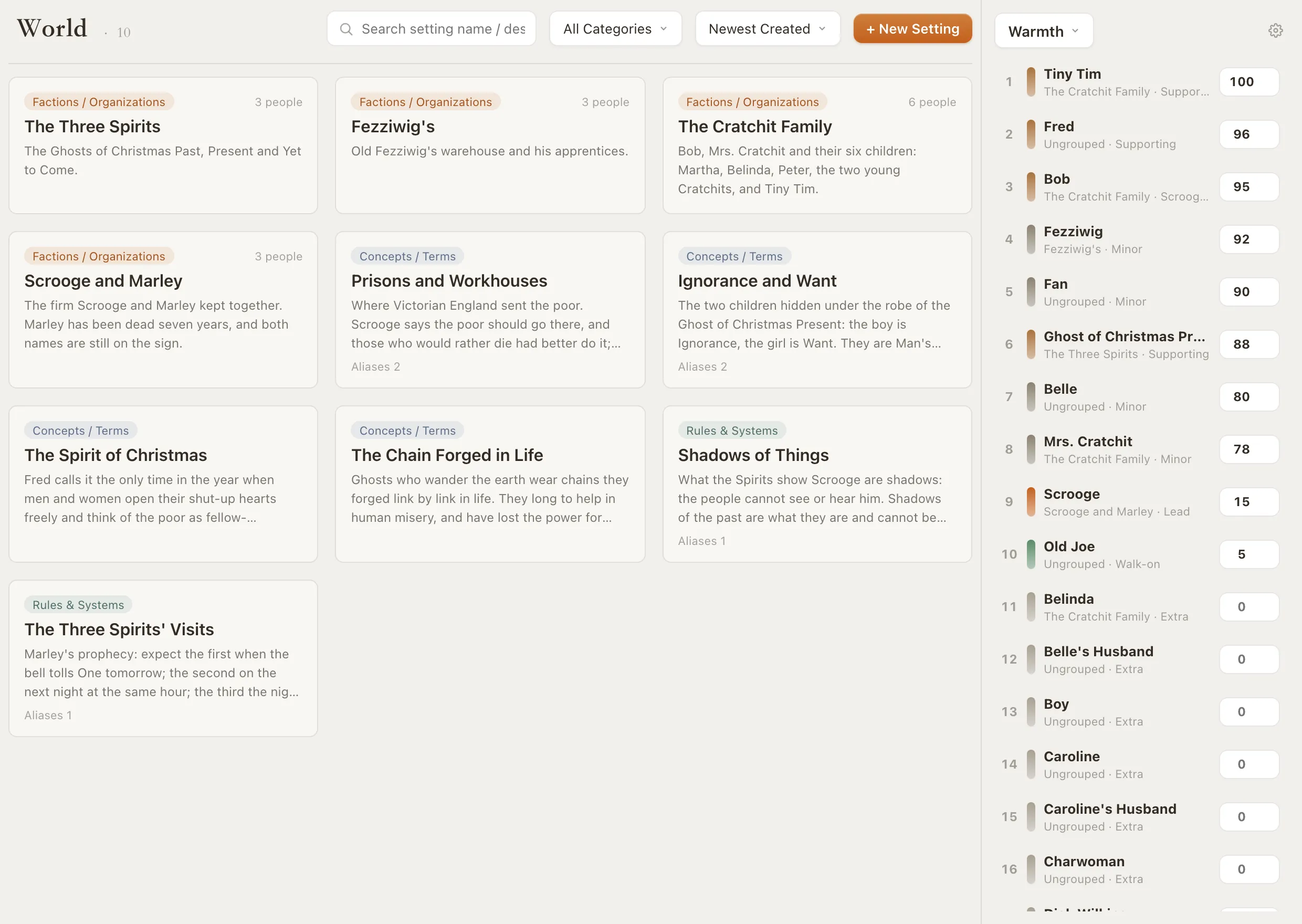
Add the characters, places and rules your fic depends on. A character card holds aliases, factions and relationships; a lore entry holds a rule, a term or a piece of history. Select a name in your draft, right-click and choose Connect to… to link it; click the name later to read the card without leaving the scene.

Loomworld does not come with canon information. You add what your fic needs, which is usually far less than the whole wiki.
Story bible software

Loomworld world module: entries for the Three Spirits, the Spirit of Christmas and other world notes from A Christmas Carol

Record where your AU breaks from canon

Turn on the Activity toggle for a character's age, occupation, faction or phase status (their state at that point in the story) and record a new value at the chapter where it changes. Relationships can be written both ways, so one-sided pining or a secret betrayal reads correctly from each side.

Free relationship chart template

Loomworld character module: the relationship canvas for A Christmas Carol, with Scrooge at the centre, and the character list grouped by faction

Drafts that don't expire

Nothing in a Loomworld project is deleted on a timer. Each scene keeps its last 25 versions in its history, version snapshots restore the project to an earlier state, and deleted scenes wait in the archive box.

Know where your project lives: the desktop app keeps it in a folder on your computer, and the web app keeps it in this browser's storage, so clearing site data clears it too. Export project saves the whole thing as a .quill.json file you can load anywhere; do that regularly, or turn on cloud sync, which needs a subscription.

  • 25 versions per scene
  • Version snapshots and an archive box
  • Full backup as .quill.json

Export a chapter and post it

Loomworld is not a publishing site. When a chapter is ready, export it as plain text: it keeps your chapter number and title and leaves out your private notes, ready to paste into a posting form. Plain text drops formatting, so check italics after you paste. Word and PDF exports are there too.

Redraw the canon map, if your fic needs one

Sketch the world on a 3D terrain map or a 2D ink-style map, with regions, roads, rivers and location pins; the 2D editor adds 80 stamps for castles, temples, ships and more. The two versions are drawn separately. Places on the map are the same records your scenes use.

The AI is optional

You never have to use it. Quill, the AI assistant, needs a subscription and cloud sync for the project. When you ask it to change your draft, the change arrives as a proposal you approve; its background upkeep refreshes chapter summaries but never edits your text. Loomworld does not use your writing to train or improve AI models.

Start your fic in three steps

  1. 1

    Paste in a chapter

    Start a project and paste in the chapter you are working on.

  2. 2

    Add the canon you lean on

    Create cards for the characters in that chapter and connect their names in the text. Note any fact your AU changes, and the chapter it changes in.

  3. 3

    Export and post

    When the chapter is done, export it as plain text and paste it into your archive's posting form.

Where to write a long fic

Most fic writers mix tools. Here is what each of these three is good at.

CapabilityLoomworldAO3 draftsGoogle Docs
Drafts deleted on a timerNoUnposted works, about a month after creationNo
Character and canon cards that open from the text—Manual links to your notes
Character details that change by chapter——
Post, tags, kudos and comments——
Real-time co-writing——
Native phone app——
Write without AI

Checked 3 November 2026. AO3's draft rule applies to drafts of unposted works; draft chapters of a posted work are handled differently. See AO3's Posting and Editing FAQ for the current wording. Tell us at [email protected] if something has changed.

Frequently asked questions

What software do fanfic writers use to write?

Many write in Google Docs, a notes app or the archive's own draft box, and keep canon notes in a wiki tab. Loomworld is for long, multi-chapter fics where keeping the cast, the canon and your AU changes straight is the hard part.

Is Loomworld free for fanfiction?

The free plan includes the editor and every story bible module with no time limit, with projects saved on your device. Quill, the AI, and cloud sync need a subscription.

Where is my fic stored, and how do I back it up?

In the desktop app, in a project folder on your computer; in the web app, in your browser's storage, which clearing site data will erase. Use Export project to save a .quill.json backup you can load on any device, or turn on cloud sync with a subscription.

Does Loomworld use AI on my fic?

Only if you choose to use Quill, which needs a subscription. Changes it proposes to your draft take effect only when you approve them. Loomworld does not use your writing to train or improve AI models.

Can I post to AO3 from Loomworld?

Not directly. Export the chapter as plain text, paste it into the posting form, and check italics and paragraph breaks before you post.

Is there a phone app?

No. Loomworld is built for writing on a computer. If you draft on your phone, keep doing that and bring chapters into Loomworld when you revise.

Does it include canon information for my fandom?

No. You add the characters, places and rules your fic uses. Most fics need a small part of canon, and keeping only that part makes it easier to see what your version changes.

Bring one chapter in

Start a free project, paste in your latest chapter, and add cards for the characters in it.