CHARACTER TRACKING

A character arc tracker: record how each character changes, chapter by chapter

A character arc worksheet records who someone is at the start and where they should end up. A long book needs the middle too: who they are in chapter 12, which side they are on by chapter 30, and exactly when that changed. In Loomworld you record those changes yourself, at the chapter where they happen: a character's phase status, age, occupation and faction can each carry a chapter track, right next to the draft.

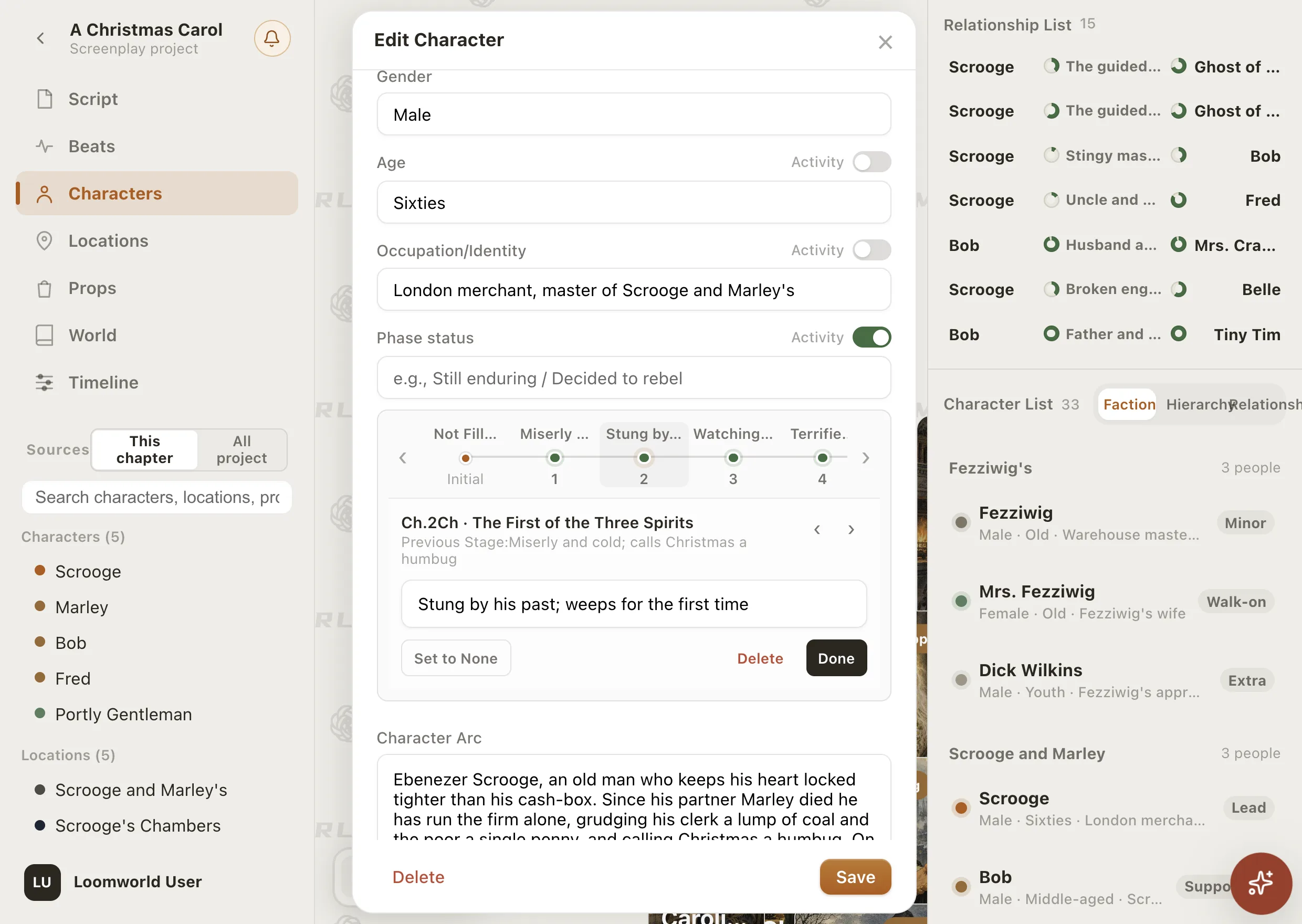
Loomworld character editor for Scrooge in A Christmas Carol: the Phase status field has a chapter track, and chapter 2 records the change from “Miserly and cold; calls Christmas a humbug” to “Stung by his past; weeps for the first time”

Why character arcs are hard to keep track of

01

The character sheet goes stale

You fill in a profile before chapter one. By chapter forty the character has changed jobs, sides and age, and the sheet still describes who they used to be.

02

The turning points live in your head

Where exactly did she stop trusting him? Without a record by chapter, you reread to find out, or you guess and hope a reader does not notice.

03

Worksheets get heavy with a big cast

One arc worksheet is easy. Keeping twenty characters' arcs current across a long series means regular manual work in a document that knows nothing about your chapters.

How Loomworld tracks a character's arc

An inner arc, chapter by chapter

Phase status is where the inner arc goes. In the demo book, Scrooge's reads “Miserly and cold; calls Christmas a humbug” in chapter 1, “Stung by his past” in chapter 2, “Watching other people's Christmas, begins to repent” in chapter 3, “Terrified and pleading before his own grave” in chapter 4 and “Reborn: generous and merry” in chapter 5. Each stage stays in force until the next change point.

Switch on Activity, the toggle beside a field, and a track appears under it: the starting value on the left, one dot per chapter. Click a chapter to add a change point. Age, occupation/identity and affiliated faction work the same way.

  • Phase status, age, occupation and faction
  • Click a chapter dot to add a change
  • Each change holds until the next

Write the arc in your own words

Character Arc is a free-text field for the shape of the whole arc: where the character starts, what changes them, where they stand now and what is still unresolved. The chapter tracks say when each stage begins; this field says why.

See relationships at a chosen chapter

On the relationship canvas, switch to Dynamic Slices and pick a chapter to see the web of relations as it stands in that chapter. A relationship can record its own change as well, such as allies turning into enemies in chapter 12. Props have the same kind of track for who holds them.

Relationship chart template

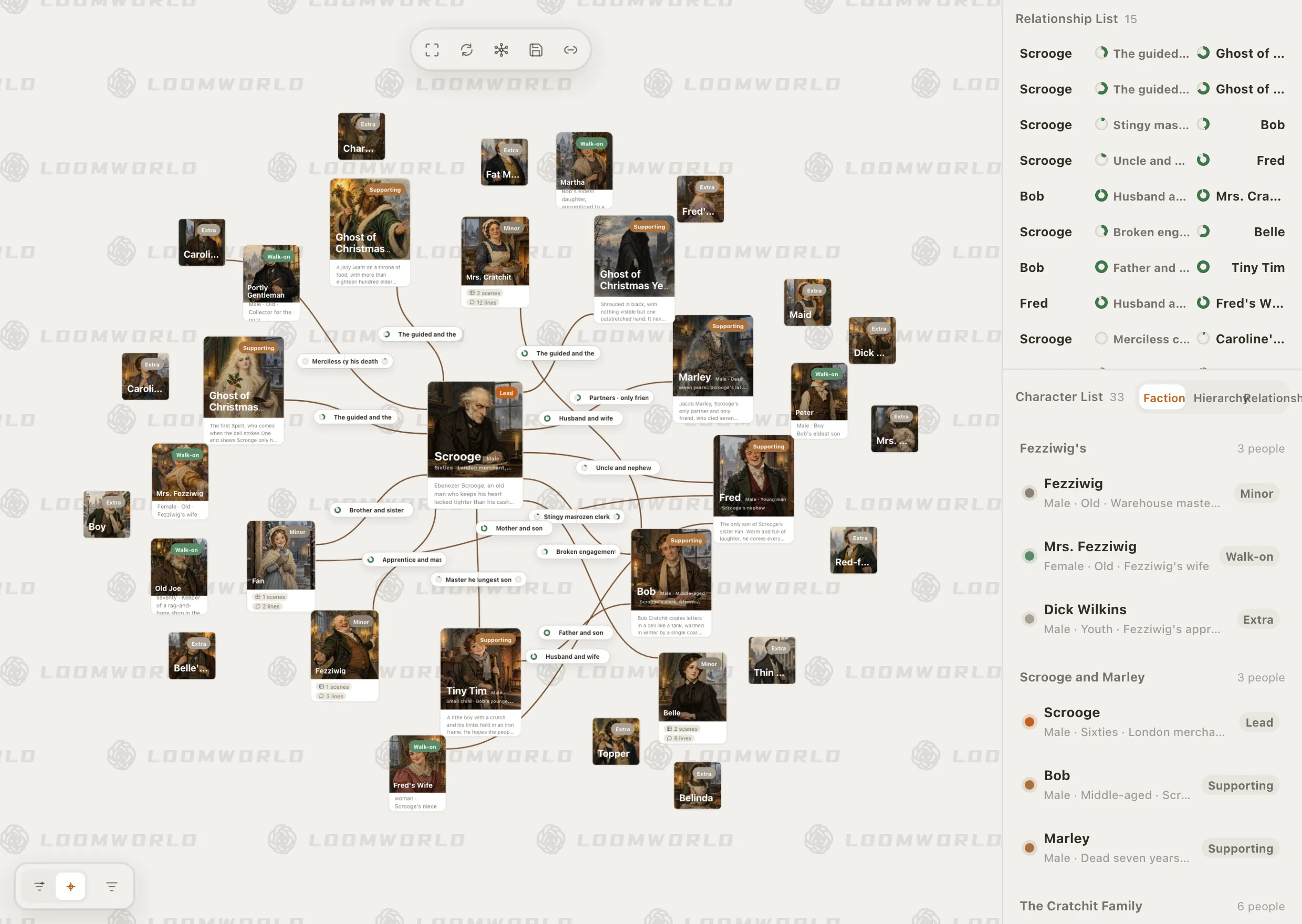
Loomworld character module: the relationship canvas for A Christmas Carol, with Scrooge at the centre, and the character list grouped by faction

A summary of where they stand

With a paid plan and the project synced to the cloud, Quill can write an AI profile for a character: where they stand as of the chapters you have written, with links back to the scenes it drew on. Edit the profile yourself and it stays yours; Quill will not overwrite it.

Continuity checking

Tracking an arc in three steps

  1. 1

    Have chapters to hang changes on

    Change points attach to chapters, so write or create at least one. Until then the Activity switch is greyed out.

  2. 2

    Turn on Activity

    Double-click the character, switch on Activity beside the field that will change, and fill in how things stand at the start.

  3. 3

    Click a chapter, add the change

    Pick the chapter where it changes, type the new value and press Done, then Save the character.

A static arc worksheet or a chapter tracker

Compared with a static character arc worksheet, such as a PDF or a document. A spreadsheet can be built to do more, at the cost of setting it up and keeping it current yourself.

CapabilityLoomworldStatic arc worksheet
Starting point and where the arc should go
What is true at any given chapterClick the chapterReread your notes
Linked to the chapters of the draft—
Relationships at a given chapter—
Prop holders by chapterAnother worksheet
Free-text arc notes
Works on paper—

A worksheet is still a good place to think an arc through before you write. Loomworld is where you keep it once the chapters exist.

Frequently asked questions

What is a character arc tracker?

A way to record how a character's beliefs, goals or behaviour change because of what happens in the story, and when, rather than only who they are at the start. In Loomworld you record each stage in the phase status field at the chapter where it begins, and describe the whole arc in a free-text field.

Which details can change by chapter?

For characters: age, occupation/identity, affiliated faction and phase status. For props: who holds them. Relationships can also record a change at a given chapter.

Does Loomworld detect character changes automatically?

No. You add change points yourself, at the chapter where they happen. With a paid plan and cloud sync, Quill can summarise where a character stands as of the chapters you have written.

Can I plan characters before I start writing?

Yes. Characters, relationships and the arc field work before chapter one. Change points need chapters to attach to, so create at least one first.

Is it free?

Yes. Characters, chapter tracks and the relationship canvas are part of the free plan, with projects saved on your device. Quill's AI profiles need a paid plan and cloud sync.

Watch one arc unfold

New accounts start with a demo book, A Christmas Carol. Open Scrooge to see his phase status change from chapter to chapter, then try it on your own lead.