COMPARISON

A Campfire Writing alternative where your world changes chapter by chapter

Campfire is a modular worldbuilding suite: manuscript, characters, timeline, maps, calendar, encyclopedia, arcs, and specialised modules for magic, species, languages, cultures and religions. Loomworld has fewer specialised worldbuilding modules and no phone app. What it does instead is tie the story bible to the draft: characters, props and places are linked to the scenes they appear in, and changes are recorded at the chapter where they happen. Here is where each one is the better choice.

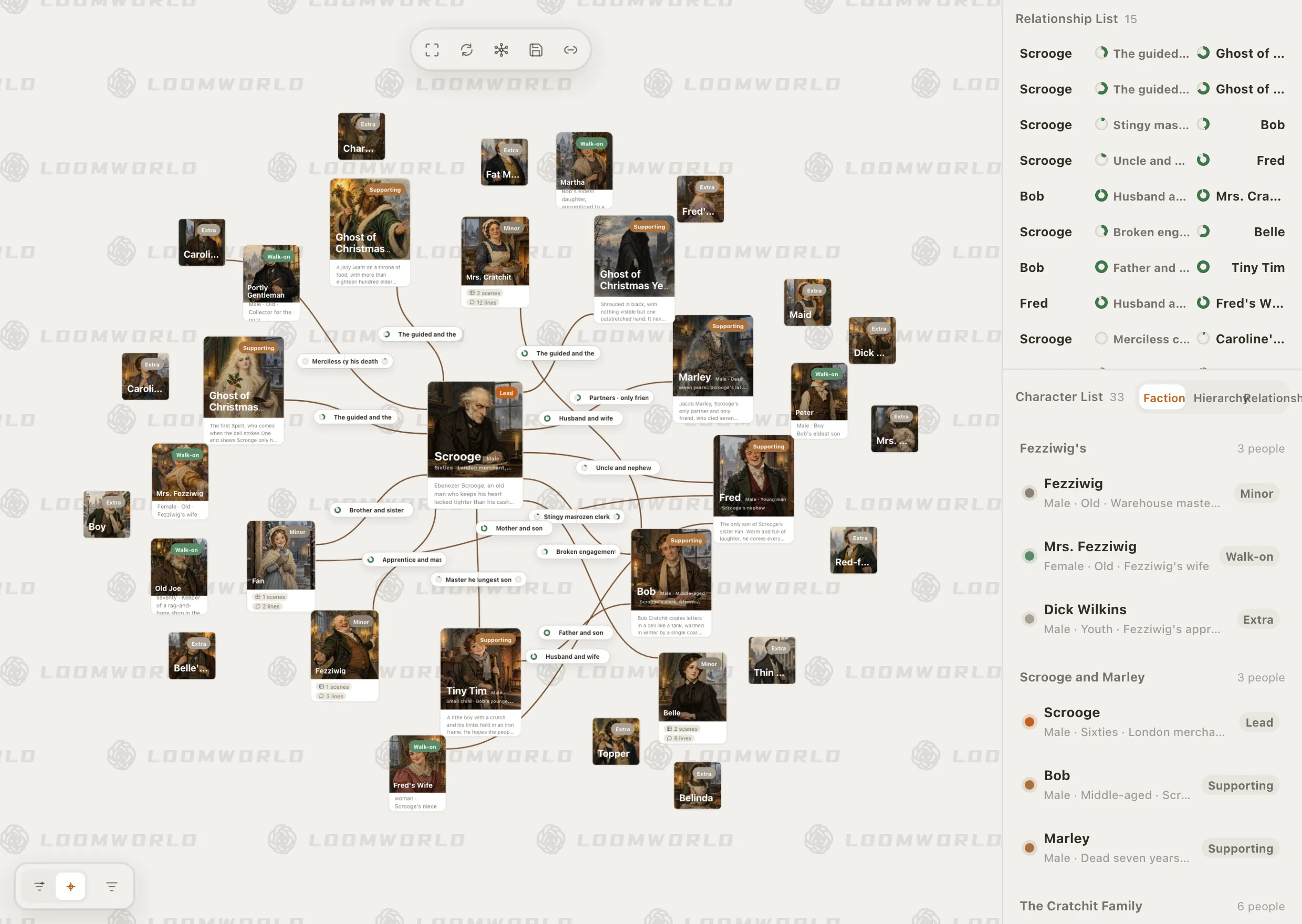
Loomworld character module: the relationship canvas for A Christmas Carol, with Scrooge at the centre, and the character list grouped by faction

Why writers look for a Campfire alternative

01

Paying module by module

On the browser and desktop apps, Campfire's free plan caps each module, for example 10 characters, 5 locations and 25,000 manuscript words. Unlimited use of every module starts at US$12 a month, or you buy the modules you need one by one.

02

Setting up before writing

Eighteen module types is a lot of structure to choose from. Some writers would rather the cast list grow out of the draft than design the world first.

03

Keeping the bible in step with the draft

A character switches sides in chapter 23, a ring changes hands in chapter 9. Wherever your notes live, someone has to record that and keep it tied to the right point in the book.

What Loomworld does differently

Character cards created from speaker lines

Mark a line of dialogue as a speaker line and, when you commit the name, Loomworld checks it against existing names and saved aliases. A match links to that character; a new name gets a new card. Background, relationships and later changes are still yours to fill in.

Select a name in the text, right-click and choose Connect to… to link it to a card. The link follows the card, so a rename does not break it. Scene and line counts on the cards come from the draft itself.
Story bible software

Loomworld character module: the relationship canvas for A Christmas Carol, with Scrooge at the centre, and the character list grouped by faction

Changes recorded at the chapter where they happen

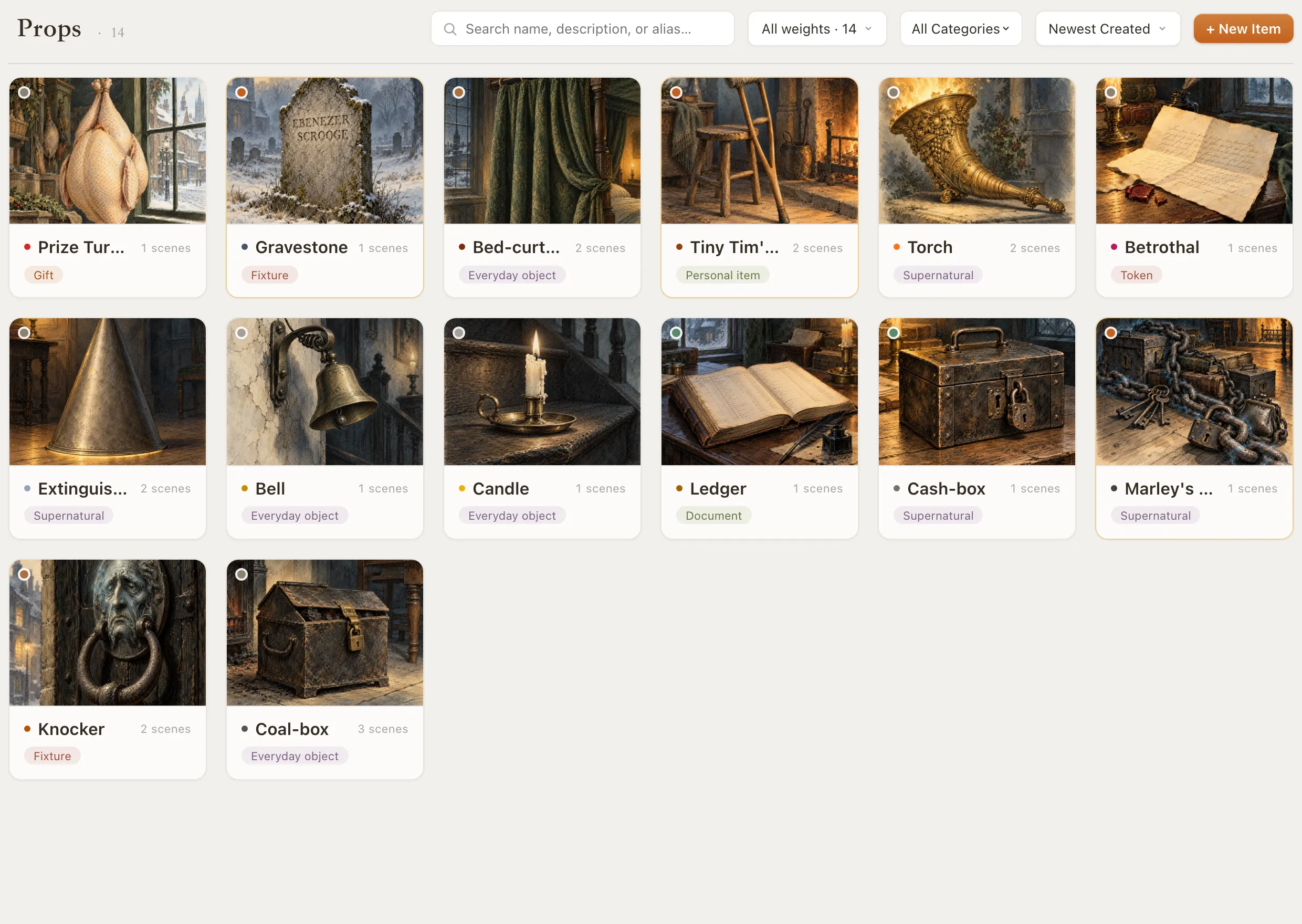
Turn on the Activity toggle for a character's age, occupation, faction or phase status (their state at that point in the story) and record a new value at the chapter where it takes effect. Props have a per-chapter track for their owner, meaning who has the object at the time. Check the track to see who held the ring in chapter 30.

Campfire's Arcs module also tracks changes over time. The difference is the anchor: in Loomworld each change is pinned to a chapter of the manuscript you are writing.

The character arc tracker

Loomworld props module: cards for the knocker, the coal-box, Marley's chain and other objects from A Christmas Carol

Story time and chapter order side by side

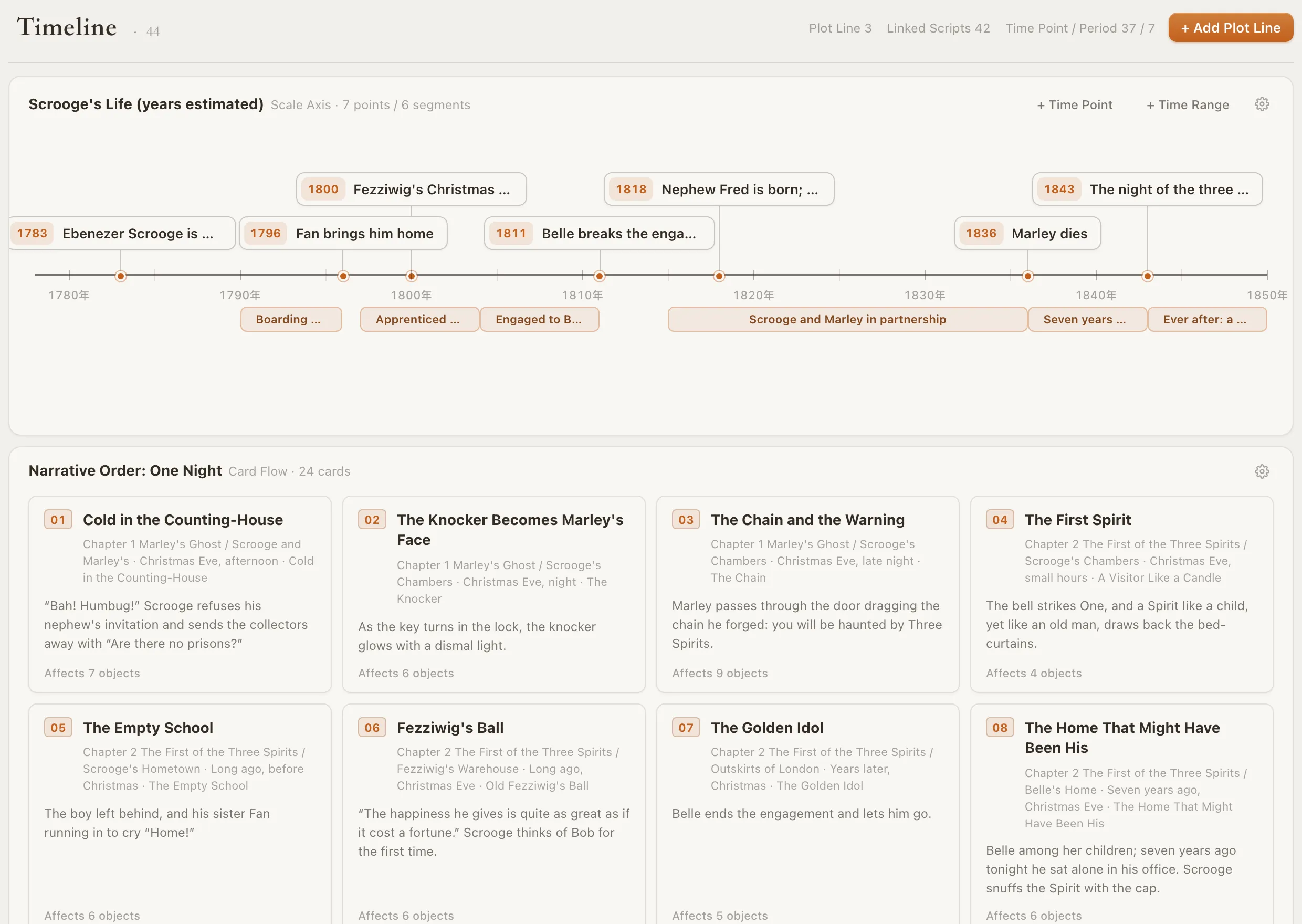
A timeline can be a dated scale axis or a row of event cards in plain order. Each event can be linked to the chapter and scene where readers meet it, so flashbacks stay straight.

Loomworld timeline: Scrooge's life on a scale axis from 1783 to 1843, above the one-night narrative order as numbered scene cards

Setups and payoffs with overdue warnings

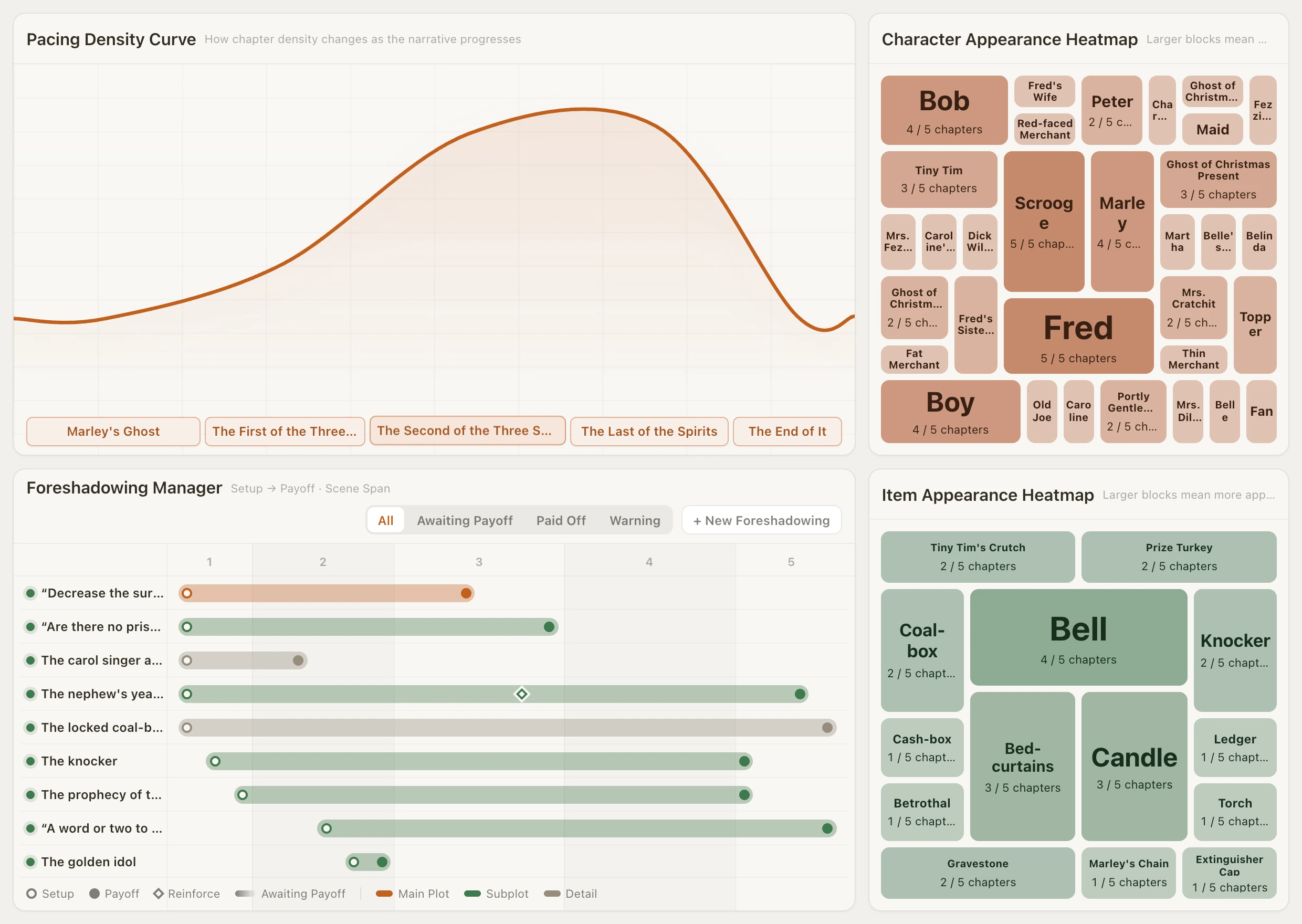
The Foreshadowing Manager draws each setup, reminder and payoff as a span across your chapters and warns when a thread has gone unresolved for too long. You mark the threads yourself; it does not find them for you.

The foreshadowing tracker

Loomworld Beats page: pacing density curve, character and item appearance heatmaps, and the Foreshadowing Manager showing setup-to-payoff spans across five chapters

When Campfire is the better choice

Stay with Campfire if you want dedicated modules for magic systems, species, languages, cultures, religions or philosophies, a mobile writing app, or a free plan that lets you try every module. Campfire also sells lifetime access. Loomworld keeps world notes as lore entries in five categories, has no phone app, and does not import Campfire projects.

  • Specialised worldbuilding modules
  • CF Creators mobile writing app
  • Lifetime purchase option
  • Buy only the modules you use

Moving a book from Campfire

  1. 1

    Export your manuscript

    Export the manuscript from Campfire as a DOCX file, and keep your Campfire notes open beside you for reference.

  2. 2

    Bring the draft in

    Attach the DOCX and choose “This is my draft”. Quill shows the estimated credits, then sorts the text into chapters and scenes without changing your words; this uses AI credits from a paid plan. Or paste chapters in by hand at no cost.

  3. 3

    Rebuild the bible as you revise

    Campfire's modules do not carry over. Mark speaker lines and connect names to cards as you go, and add the chapter changes the next scene depends on first.

Loomworld and Campfire side by side

Based on each product's public pricing page and documentation. Prices in US dollars.

CapabilityLoomworldCampfire
Free planEditor and every bible module; AI needs a subscriptionEvery module, with limits per module on browser and desktop
Paid plans$4.99–$19.99 per 30 daysFrom $12/month for all modules, or module by module
Lifetime option—
Write the manuscript in the same app
Track how things change over the storyBy chapter of the manuscriptArcs module
Character cards created from dialogueNot described
Magic, species, language and religion modules—
Foreshadowing board with overdue warningsNot described
Mobile app—CF Creators

Checked 3 November 2026 against campfirewriting.com/pricing and Campfire's tutorials. “Not described” means we could not find it on Campfire's public pages, not that it is impossible. Tell us at [email protected] if something has changed.

Frequently asked questions

Who should switch from Campfire to Loomworld?

Novelists whose main problem is keeping the bible in step with a long draft: who is where, who holds what, which threads are still open by chapter. If you mostly build worlds, or rely on the magic, species or language modules, Campfire fits better today.

Is there a free alternative to Campfire?

Loomworld's free plan keeps the editor and every story bible module free with no time limit, with projects saved on your device. Quill, the AI, needs a subscription and cloud sync turned on for the project.

Can I import my Campfire project?

No. Bring your manuscript in as a DOCX file. Campfire's characters, maps and encyclopedia entries do not carry over, so you rebuild the cards you need as you revise.

Does importing my draft cost anything?

Pasting chapters in by hand is free. Attaching a file and choosing “This is my draft” runs an AI analysis that uses credits; you see the estimate before it starts.

Does Loomworld have a magic system module?

No dedicated one. World notes are lore entries in five categories, including rules and systems, so a magic system is one or more entries the draft and the AI can refer to.

Do I have to use the AI?

No. You can write and keep the whole bible by hand. If you use Quill, changes it proposes to your draft or your bible take effect only when you approve them, and one undo reverses an applied proposal. Background upkeep refreshes chapter summaries and character profiles without asking, but never edits your text.

Try it with one chapter

Start a free project, paste in a chapter, and mark the dialogue as speaker lines. Watch the cast list fill in from the page.