AI BOOK EDITOR

An AI book editor that works inside your novel

Edit a passage on its own and the context that matters is missing: what happened in chapter 3, who knows what, which rule the world runs on. Loomworld's AI, Quill, works inside your project. It reads summaries of the whole story, opens the chapters and records a question needs, and checks one chapter or the whole manuscript for contradictions and plot holes. When you want a passage reworked, you see the new version before anything is replaced. It is a story editor, not a proofreader: there is no grammar or spell checker.

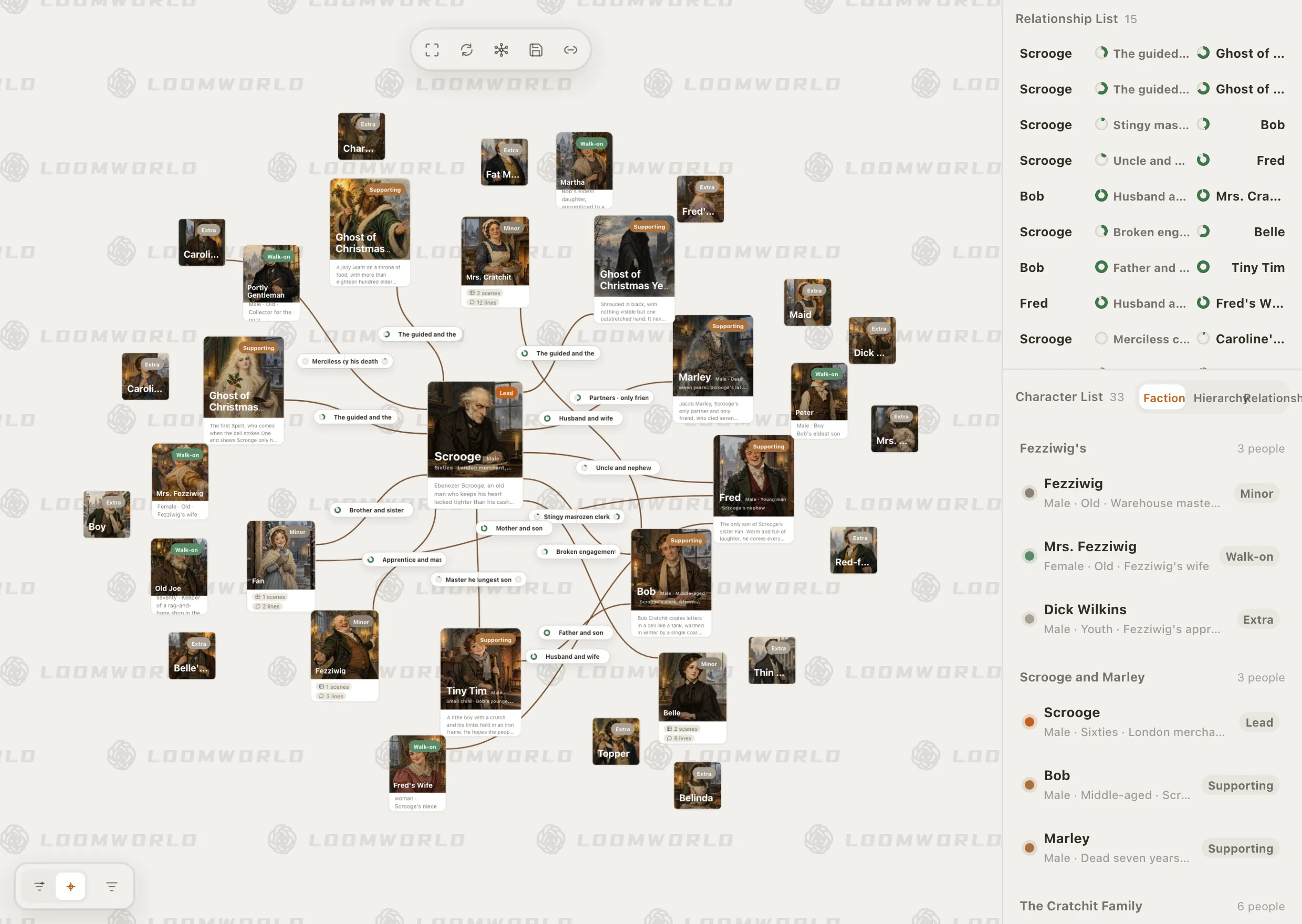
Loomworld character module: the relationship canvas for A Christmas Carol, with Scrooge at the centre, and the character list grouped by faction

What writers want from an AI book editor

01

Someone who remembers chapter 3

A contradiction between chapter 3 and chapter 41 is invisible in any single passage. Catching it takes a reader who has the whole book in view.

02

Edits that keep your voice

Writers want to see each proposed change and decide whether it sounds like them before it goes into the book.

03

Will my manuscript train an AI?

Pasting a manuscript into a chatbot raises a fair question: where does the text go, and is it used to train anything?

How Loomworld edits a novel

Continuity and plot-hole checks across the book

In the chat, choose the consistency check or the plot-hole check and name the range: a chapter, a scene or the whole manuscript. Quill reads the draft together with your records and lists what contradicts what, with the scene and the fact it clashes with. The plot-hole check sorts what it finds into definite holes, possible risks and things not yet explained.

Checks flag issues without changing your draft. What to change is your decision.
Novel continuity checker

Loomworld character module: the relationship canvas for A Christmas Carol, with Scrooge at the centre, and the character list grouped by faction

Passage edits you review before they land

Select a passage, right-click and choose rewrite, expand, condense or polish, and add a note if you have one: “keep her voice, cut the adverbs”. The result arrives as a before and after, and replaces your text only when you confirm.

For changes that reach across chapters, describe them in the chat. Quill answers with a confirmation card listing each edit; you apply or refuse the card as a whole, a large change may come as several cards, and one undo reverses an applied card.

  • Rewrite, expand, condense or polish
  • See the new version before it replaces yours
  • One undo reverses an applied card

Background reports while you write

With background upkeep switched on, Loomworld starts refreshing about 15 minutes after you stop typing, one item at a time: chapter summaries, an overview of the whole story, profiles of the lead and supporting characters in the chapters you changed, and continuity reports. Each chapter shows whether it has been checked and how many conflicts or doubts were found. Upkeep steps aside while you are using Quill, so summaries can lag behind your latest edits for a while.

This upkeep never edits your manuscript, and summaries you wrote by hand are never overwritten.

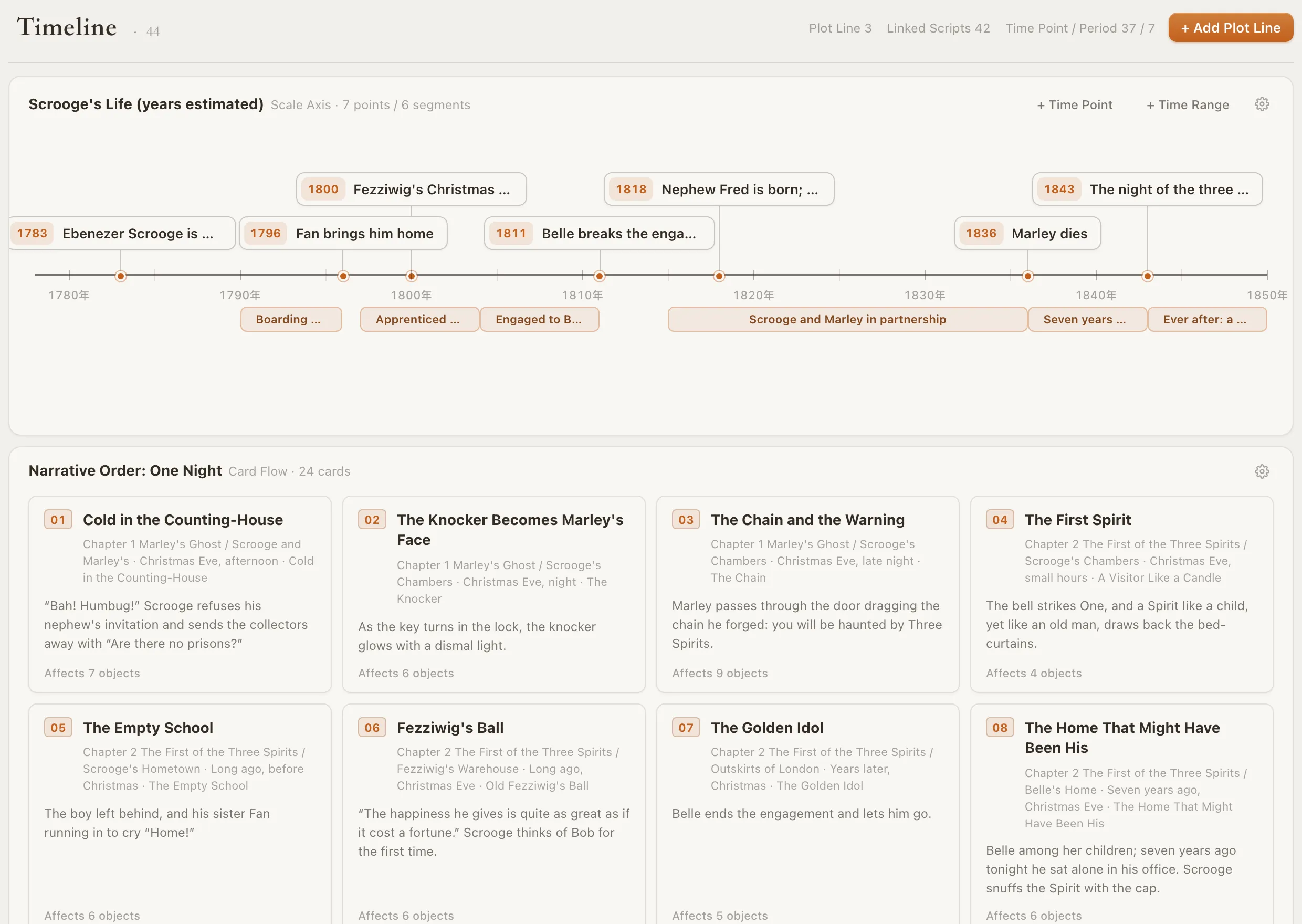
Loomworld timeline: Scrooge's life on a scale axis from 1783 to 1843, above the one-night narrative order as numbered scene cards

It knows your book, not just the page

Characters, places, objects, world rules and the timeline live in the same project as the draft, and Quill draws on them when it answers. Ask “does anyone know about the letter before chapter 12?” and it follows the trail through the records and the scenes.

Story bible software

What it does not do

Loomworld does not include a grammar or spell checker, and it does not score your pacing or compare your book with bestsellers. For proofreading, export to Word and use a grammar tool. For judgement about what the book is trying to be, a human editor is still the best reader.

Quill can be wrong, so treat its findings as a list to review. It needs a sign-in, an active subscription and cloud sync turned on for the project. Loomworld does not use your manuscript to train or improve any model.

Edit your novel in three steps

  1. 1

    Bring the manuscript in

    Attach a TXT or DOCX and choose “This is my draft”: Quill sorts it into chapters and scenes without changing your words, after showing the estimated credits. Or paste chapters in by hand.

  2. 2

    Run a check

    Ask for the consistency check or the plot-hole check on one chapter first, then on the whole book.

  3. 3

    Fix what you agree with

    Fix it yourself, or ask Quill for a proposal and review the before and after. Anything you refuse stays exactly as you wrote it.

Loomworld compared with other ways to edit a novel

These tools do different jobs, and many writers use more than one. Loomworld is for story consistency and passage edits inside the project; it is not a proofreader.

CapabilityLoomworldProWritingAidMarloweHuman editor
Grammar and spelling checks—Not describedCopy editor or proofreader
Style and readability feedback—Readability and clichésLine editor
Contradictions across the whole bookConsistency checkPlot Analysis, on creditsCharacter consistency feedbackDepends on the service
Report on structure, pacing and genre—Plot, character and manuscript analysisDevelopmental editor
Reads your story bibleNot describedNot describedNotes you send
Rewrites passagesProposals you approveRephrase sentencesNeverLine edits
Write the book in the same appWeb editor; also Word, Google Docs, Scrivener——
How you payFree editor; AI subscription from $4.99 per 30 days, with creditsFree plan, 500 words at a time; Plot Analysis on creditsFrom $29.95 per reportUsually per word

Checked 3 November 2026 against prowritingaid.com/novel-editor, prowritingaid.com/plot-checker and authors.ai/marlowe. “Not described” means we could not find it on their public pages. Tell us at [email protected] if something has changed.

Frequently asked questions

Is there an AI that can edit a whole book?

Yes, in different ways. Grammar tools such as ProWritingAid work through the text line by line; report tools such as Marlowe analyse structure and pacing; Loomworld checks the whole manuscript for contradictions and plot holes against your character and world records, and edits passages as proposals you approve.

Can ChatGPT edit my book?

It can edit what you give it, and a project with uploaded files helps. If your manuscript lives elsewhere and you upload copies, the chatbot works from the copy you last uploaded and its edits have to be carried back to your draft. In Loomworld the draft, the records and the summaries are in one project, so edits land in the manuscript itself.

Is it allowed to use AI to edit my book?

Rules depend on where you publish. Amazon KDP, for example, asks authors to disclose AI-generated content but not AI-assisted content, such as checking and polishing text you wrote yourself. Text the AI writes for you, such as an expanded scene you keep, may count as AI-generated. Check the current rules of your publisher or platform; this is not legal advice.

Will it change my manuscript without asking?

No. Checks write nothing. Passage edits and proposals show you the new version and change your text only when you confirm. Background upkeep refreshes summaries and AI profiles, never your manuscript.

Does it check grammar and spelling?

Loomworld has no dedicated grammar or spell checker. It is a story editor: continuity, plot holes and passage-level edits. Export your manuscript to Word and use a grammar tool for proofreading.

Is my manuscript used to train AI?

No. Loomworld does not use your text to train or improve any model. It goes to model providers only to run AI tasks: the ones you start, and background upkeep while it is switched on.

What does it cost?

Quill, the AI, needs a subscription, from US$4.99 for 30 days, and cloud sync turned on for the project. The editor and story bible stay free.

Check your first chapter

Start a project with your manuscript and run the consistency check on one chapter before you check the whole book. Quill needs a subscription and cloud sync for the project.