ADAPTATION

From novel to screenplay, with your story bible intact

Bring your novel into Loomworld and ask Quill to adapt it. Prose becomes scenes with headings, action, and character and dialogue lines, written into a real screenplay structure instead of a formatted text file. Your characters, places and props stay linked the whole way, and every change waits for your approval.

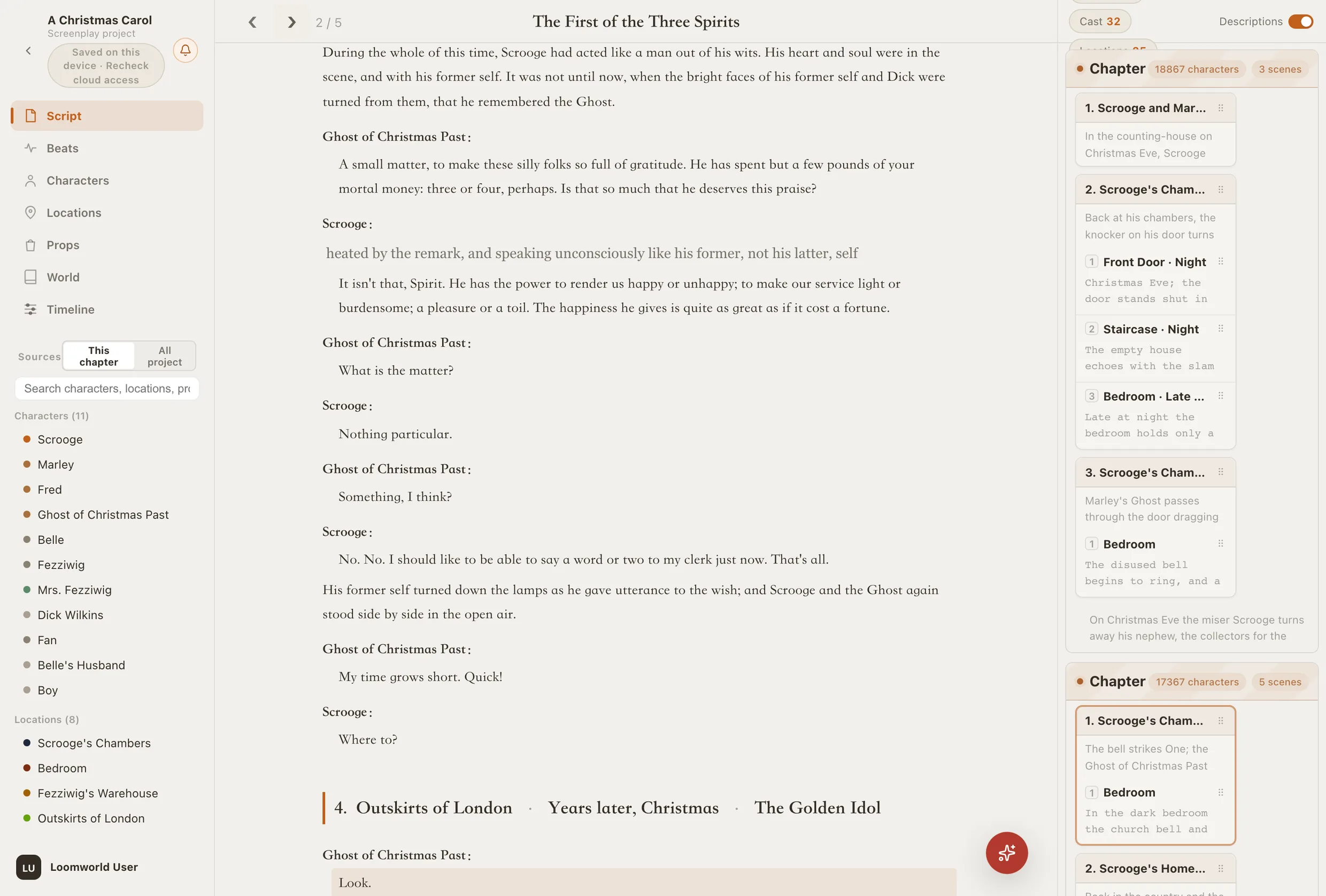
Loomworld script editor: A Christmas Carol in screenplay form, with character lines, a dialogue action, dialogue and the scene heading “Outskirts of London · Years later, Christmas”

Why adapting a novel by hand is slow

01

Reformatting eats the time

Turning paragraphs into scene headings, action lines and dialogue is hours of mechanical work per chapter before any real adaptation decisions get made.

02

The bible gets left behind

Screenwriting software starts empty. Every character, location and prop you already defined has to be entered again.

03

Prose does not map to scenes

Interior monologue, summary and backstory have no direct screen equivalent. Someone has to decide what becomes action, what becomes dialogue and what goes.

How adaptation works in Loomworld

A real screenplay structure

Loomworld's script is built from structured lines: scene headings with location, time and a short title; description; character; dialogue; dialogue actions; narration; transitions. The editor knows which line is a speaker and which is action, so the result is a screenplay you can keep writing, not just text that looks like one.

  • Scenes and scene settings
  • Character, dialogue and dialogue action lines
  • Narration and transitions

The nine line types

Loomworld script editor: A Christmas Carol in screenplay form, with character lines, a dialogue action, dialogue and the scene heading “Outskirts of London · Years later, Christmas”

Adapted with the whole book in view

Tell Quill in the chat which chapters to adapt. It reads the novel and the story bible before it writes, so names, aliases, relationships and places stay consistent with what you already established.

You can steer it in the same sentence: keep the dialogue close to the book, cut the narrator, turn a remembered scene into a flashback.

Characters, places and props carry over

Character lines link to the same character cards the novel used. Scene headings pick their locations from your location library. Props in brackets are recorded on the line. The adaptation adds to your story world instead of starting a new one.

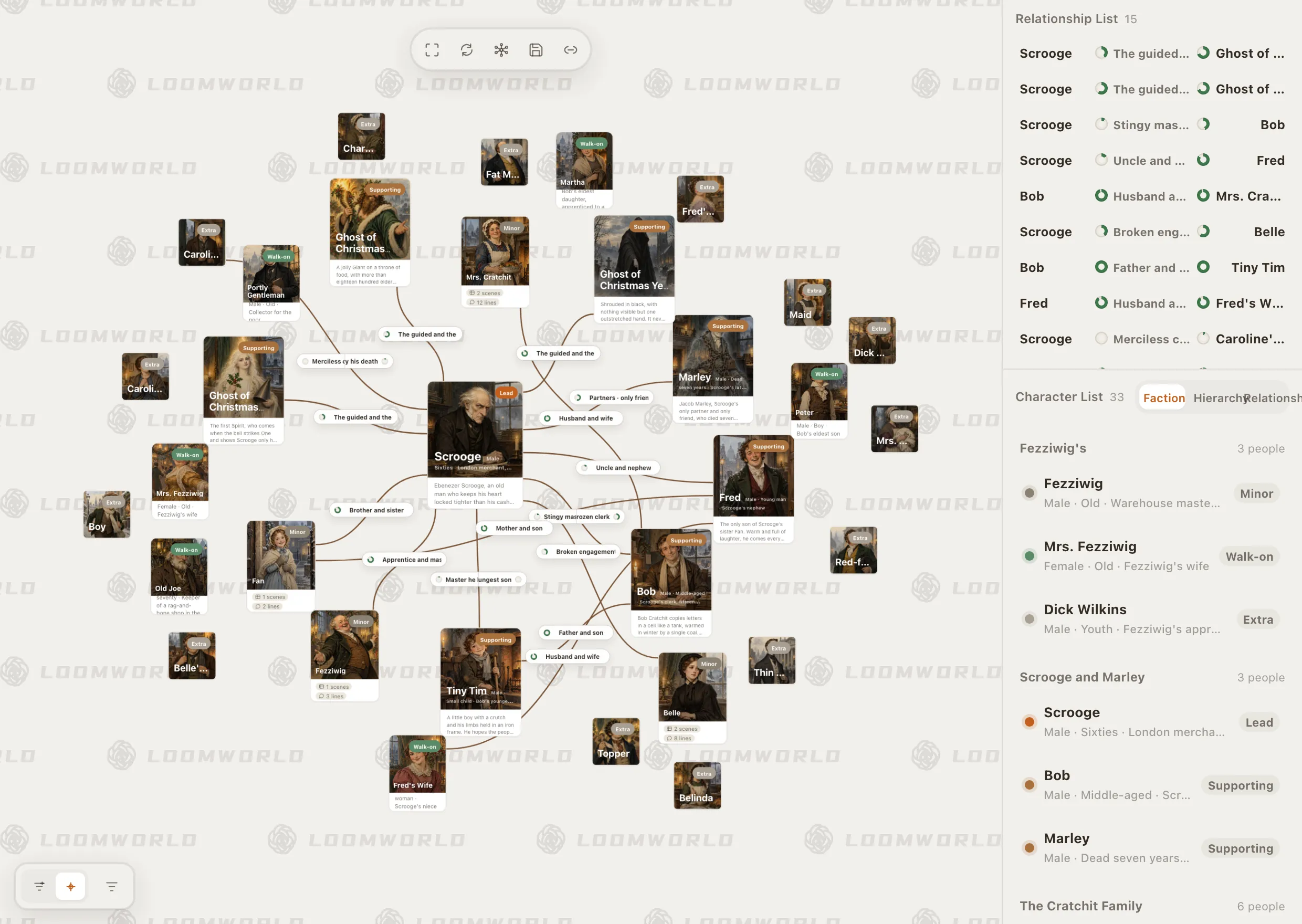
Loomworld character module: the relationship canvas for A Christmas Carol, with Scrooge at the centre, and the character list grouped by faction

Every change is a proposal

The adaptation arrives on a confirmation card with the before and after. Apply it, ask for an adjustment, or drop it. One undo reverses everything the card wrote.

  • Before and after for every change
  • Adjust with a note and regenerate
  • One undo reverses the card

Export for readers

Export the whole script or a single chapter as Word, as PDF through the print dialog, or as Quilldown plain text. Scene headings, speakers and dialogue stay recognisable in the Word layout.

Export options

Adapt a novel in three steps

  1. 1

    Bring the novel in

    Create a project and attach the TXT or DOCX file as the manuscript. To keep the prose version too, take a version snapshot first, or export the project pack and import it as a copy to adapt.

  2. 2

    Ask Quill to adapt

    In the chat, name the chapters and how you want them adapted. Quill returns the screenplay as a proposal.

  3. 3

    Review and export

    Apply what works, adjust what doesn't, then keep writing in the screenplay editor or export Word, PDF or plain text.

Loomworld compared with other ways to adapt a novel

Dedicated screenwriting software is still the standard for production drafts. Loomworld covers the step before it: getting from prose to a working screenplay.

CapabilityLoomworldScreenwriting appChatbot
Turns prose into scenes, action and dialogueBy hand
Reads the whole novel first—What you paste
Keeps characters and places linked to a bibleCharacter lists—
Changes wait for your approvalYou type itCopy and paste
Final Draft (.fdx) or Fountain export——

Compared October 2026.

Frequently asked questions

How do you turn a novel into a screenplay?

Break each chapter into scenes, give each scene a heading with place and time, turn what can be seen and heard into action and dialogue, and decide what to do with what cannot: inner thoughts, summary, backstory. Loomworld's AI does the first pass for you as a proposal, and you make the adaptation decisions.

Can AI convert my novel into a screenplay?

Yes. In Loomworld you ask Quill in the chat to adapt the chapters you name, and it writes them into screenplay structure. Treat it as a first draft: you still decide what to keep, cut and invent.

Will I lose the novel version?

Not if you keep a copy. Take a version snapshot before adapting, or export the project pack and import it as a new project; import always creates a separate copy.

Can I export to Final Draft or Fountain?

Not directly. Loomworld exports Word (.docx), PDF and Quilldown plain text. Word keeps scene headings, speakers and dialogue recognisable for readers and collaborators.

Can I write screenplays from scratch too?

Yes. Loomworld is a writing desk for novels and screenplays; the same editor and story bible work for an original script.

What does it cost?

Quill, the AI, comes with a paid plan, from US$4.99 for 30 days. The editor and story bible stay free.

Your novel already has the story. Give it scenes.

Start a project, bring the manuscript, and ask Quill to adapt the first chapter.